컴포넌트가 렌더링하는 요소를 외부에서 제어하는 세 가지 패턴.
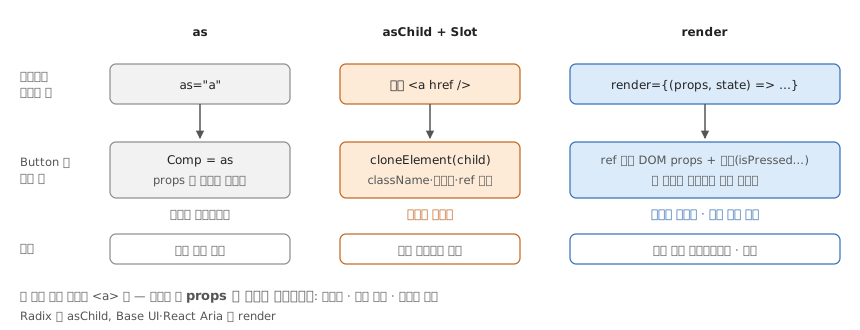
as
type PolymorphicProps<E extends React.ElementType> = {
  as?: E
} & React.ComponentPropsWithoutRef<E>

function Button<T extends React.ElementType = 'button'>({
  as,
  ...props
}: PolymorphicProps<T>) {
  const Comp = as || 'button'
  return <Comp {...props} />
}
asChild + Slot
import { Slot } from '@radix-ui/react-slot'

function Button({ asChild, ...props }) {
  const Comp = asChild ? Slot : 'button'
  return <Comp {...props} />
}
Slot 직접 구현:
const Slot = forwardRef(({ children, ...props }, ref) => {
  if (!isValidElement(children)) return null

  return cloneElement(children, {
    ...props,
    ...children.props,
    ref: ref || children.ref,
  })
})
자식 요소 타입에 따른 조건부 Props:
type ConditionalProps<T> = T extends ReactElement<any, 'a'>
  ? { href?: string; external?: boolean }
  : T extends ReactElement<any, 'button'>
    ? { type?: 'button' | 'submit' }
    : {}
render
// Element 방식
<Button render={<a href="/about" />}>Link</Button>

// Callback 방식 - state 접근 가능
<Button render={(props, state) => (
  <motion.button {...props} animate={state.isPressed ? ... : ...} />
)}>
  Animated
</Button>- Base UI useRender - render prop 커스텀 훅 구현
- React Aria render prop PR - React Aria Components에 render prop 도입
- Slot/asChild Pattern - Radix Slot vs Base UI render 비교
- React as prop (christianvm) - ElementType, ComponentPropsWithoutRef 타입 활용
- slot-jsx-pragma - cloneElement 없이 asChild 구현하는 JSX pragma
- React as prop (robinwieruch) - 디자인 시스템에서 시맨틱 HTML 유지하며 스타일 분리
- asChild in React, Svelte, Vue, Solid - 프레임워크별 render delegation 비교
- React asChild (jacobparis) - asChild 패턴 구현 튜토리얼
- Polymorphism done well - 타입 안전한 polymorphic 컴포넌트