Native Messaging — 확장이 로컬 바이너리를 실행하는 법
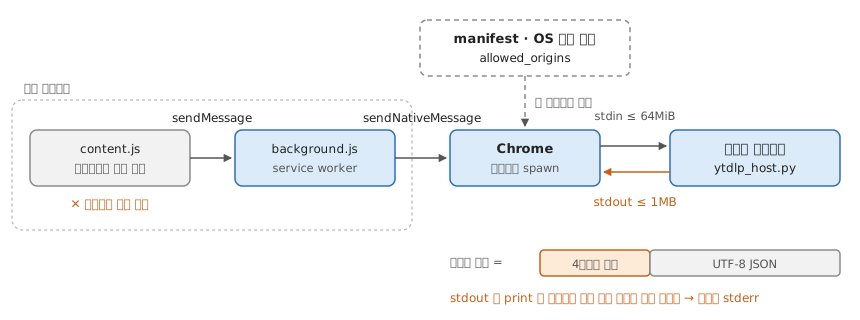
확장은 로컬 프로그램을 직접 못 돌린다. 샌드박스 안에 있기 때문이다. Native Messaging은 그 벽을 허무는 대신 구멍을 하나만 뚫는다 — 미리 등록해둔 프로그램 하나와 stdin/stdout으로만 대화한다. 띄우는 것도 확장이 아니라 Chrome이 대신 한다.

1. 미리 등록해둔다

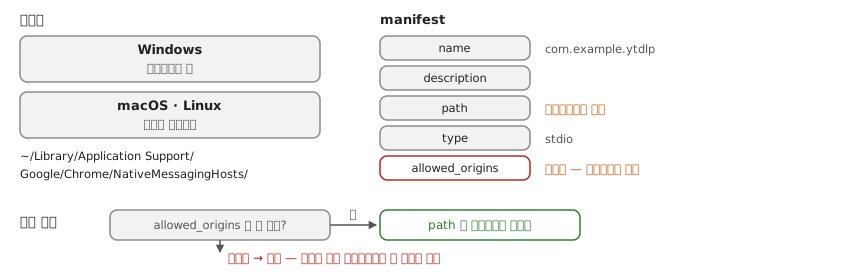
호스트를 OS의 정해진 자리에 manifest로 올린다 — Windows는 레지스트리 키, macOS·Linux는 지정된 디렉터리다.1

// ~/Library/Application Support/Google/Chrome/NativeMessagingHosts/com.example.ytdlp.json
{
  "name": "com.example.ytdlp",
  "description": "yt-dlp bridge",
  "path": "/usr/local/bin/ytdlp_host.py",
  "type": "stdio",
  "allowed_origins": ["chrome-extension://<확장 ID>/"]
}

allowed_origins가 게이트다. 여기 적힌 확장만 이 호스트를 부를 수 있고 와일드카드는 못 쓴다. 확장이 아무 프로그램이나 실행하지 못하는 이유가 이것이다. path는 절대경로여야 한다.

2. Chrome이 띄우고, 길이 먼저 주고받는다

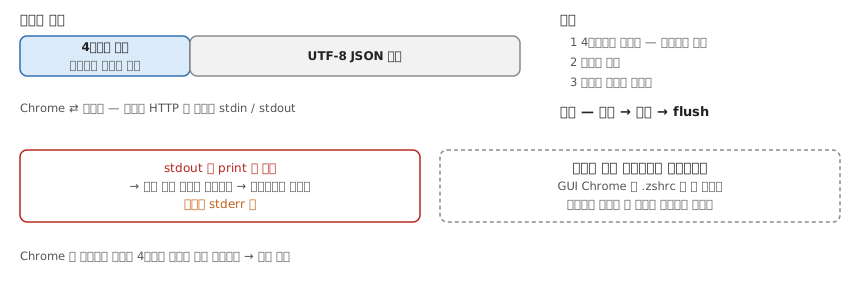
확장이 호출하면 Chrome이 path의 바이너리를 자식 프로세스로 spawn한다. 대화는 소켓도 HTTP도 아니고 stdin/stdout이다. 메시지마다 4바이트 길이 헤더(네이티브 바이트 순서) 다음에 UTF-8 JSON이 온다.

#!/usr/bin/env python3
import json, struct, subprocess, sys

def read_message():
    raw = sys.stdin.buffer.read(4)
    if not raw:
        sys.exit(0)                                  # Chrome이 파이프를 닫음
    length = struct.unpack('@I', raw)[0]             # 길이 먼저
    return json.loads(sys.stdin.buffer.read(length)) # 그만큼 본문

def send_message(obj):
    data = json.dumps(obj).encode('utf-8')
    sys.stdout.buffer.write(struct.pack('@I', len(data)))  # 보낼 때도 길이 먼저
    sys.stdout.buffer.write(data)
    sys.stdout.buffer.flush()

msg = read_message()
result = subprocess.run(
    ['/opt/homebrew/bin/yt-dlp', '-o', '~/Downloads/%(title)s.%(ext)s', msg['url']],
    capture_output=True, text=True,
)
send_message({'ok': result.returncode == 0, 'error': result.stderr[-500:]})

print 대신 sys.stdout.buffer.write인 게 핵심이다. stdout에 글자 하나라도 새면 그게 길이 헤더 자리에 끼어들어 프로토콜이 깨진다. 로그는 stderr로 보낸다.

yt-dlp절대경로로 부르는 것도 마찬가지다. GUI로 띄운 Chrome은 .zshrc를 안 읽고, 호스트는 독립 프로세스라 사용자 셸 환경을 물려받지 않는다.

3. 확장에서 부른다 — background에서만

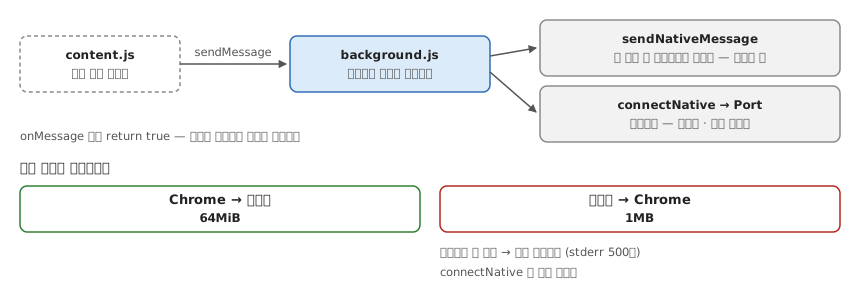
sendNativeMessage·connectNativebackground(service worker)에서만 부를 수 있다. content script는 통로 밖이라, 흐름이 두 파일로 갈라진다.

// content.js — 페이지에서 값만 뽑아 넘긴다
chrome.runtime.sendMessage({ url: location.href })

// background.js — 네이티브 통신은 여기서
chrome.runtime.onMessage.addListener((msg, _sender, sendResponse) => {
  chrome.runtime.sendNativeMessage('com.example.ytdlp', { url: msg.url }, sendResponse)
  return true // 비동기 응답이라 채널을 열어둔다
})

sendNativeMessage첫 응답 뒤 프로세스가 끝난다 — “값 던지고 끝”에 맞다. 진행률을 흘려보내야 하면 connectNativePort를 열어둔다.

크기 제한이 비대칭이다

호스트 → Chrome은 1MB, Chrome → 호스트는 64MiB. 돌려보낼 게 크면 한 번에 못 부친다 — 위 코드가 stderr를 500자로 자르는 이유이고, 큰 결과를 나눠 보내려면 connectNative 쪽이어야 하는 이유다.

Footnotes

  1. manifest는 name·description·path·type·allowed_origins 를 갖는다. “List of extensions that should have access to the native messaging host. allowed-origins values can’t contain wildcards.” / 크기 제한 — “The maximum size of a single message from the native messaging host is 1 MB”, “The maximum size of the message sent to the native messaging host is 64 MiB.” (Native messaging — Chrome for Developers)

#553raw