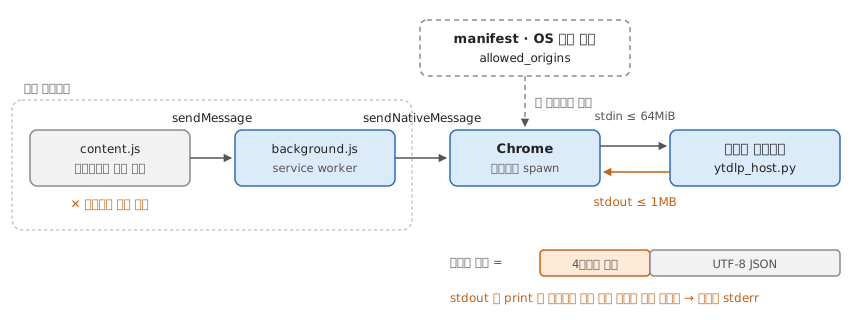
-- 확장은 로컬 바이너리를 직접 못 띄운다 — Chrome 이 manifest 를 보고 대신 띄운다
spawn :: Manifest -> ExtensionId -> Maybe Process
spawn m ext
  | ext `elem` allowedOrigins m = Just (run (path m))   -- 와일드카드 불가, path 는 절대경로
  | otherwise                   = Nothing
-- manifest = { name, description, path, type = "stdio", allowedOrigins }
-- 자리: Windows 레지스트리 · macOS ~/Library/Application Support/Google/Chrome/NativeMessagingHosts/

-- 대화는 소켓도 HTTP 도 아닌 stdin/stdout. 메시지 = 4바이트 길이(네이티브 바이트 순서) ++ UTF-8 JSON
frame :: Json -> Bytes
frame j = len (utf8 j) <> utf8 j                         -- 쓰고 flush

unframe :: Bytes -> Maybe (Json, Bytes)
unframe b | B.null b  = Nothing                          -- Chrome 이 파이프를 닫았다 — 종료
          | otherwise = let (n, rest) = B.splitAt 4 b
                        in Just (first decode (B.splitAt (fromLen n) rest))
-- stdout 에 print 한 글자가 새면 길이 자리에 낀다 → 로그는 stderr
-- 호스트가 부르는 것(yt-dlp)도 절대경로 — GUI 로 띄운 Chrome 은 .zshrc 를 안 읽고, 호스트는 사용자 셸 환경을 물려받지 않는다

limit :: Direction -> Bytes
limit HostToChrome = 1 MB      -- 비대칭. 크면 잘라 보내거나 connectNative 로 나눈다
limit ChromeToHost = 64 MiB

-- 부를 수 있는 곳은 background(service worker) 뿐 — 흐름이 두 파일로 갈린다
content    = sendMessage . extract                      -- 페이지에서 값만
background = onMessage (\m reply -> sendNativeMessage host m reply >> pure True)  -- True: 비동기 응답 채널 유지
-- sendNativeMessage 는 응답 하나 뒤 프로세스가 끝난다 · 진행률을 흘리려면 connectNative 로 Port
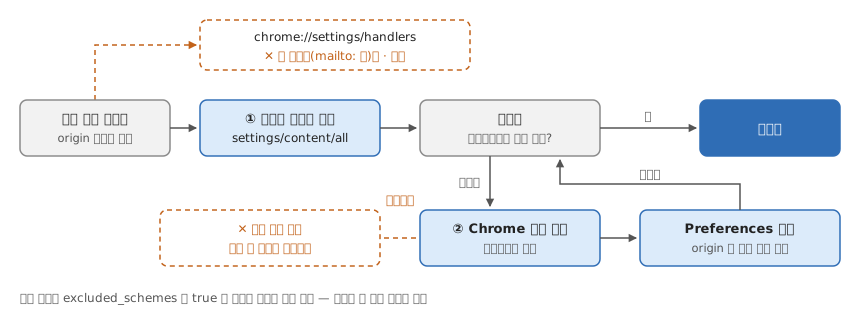
-- 설정 UI 에는 항목이 없다 — 체크는 프로필의 Preferences JSON 에 origin 단위로 저장된다
-- Preferences 의 protocol_handler.allowed_origin_protocol_pairs
type Allowed = Map Origin (Map Scheme Bool)

allowAlways :: Origin -> Scheme -> Allowed -> Allowed   -- 다이얼로그의 "항상 열기"
allowAlways o s = insertWith union o (singleton s True)

reset :: Origin -> Scheme -> Allowed -> Allowed         -- 설정 UI 에는 이 함수가 없다
reset o s = adjust (delete s) o

-- ① chrome://settings/content/all 에서 사이트 데이터 삭제 — 이걸로 풀리면 끝
-- ② 안 풀리면 Chrome 을 백그라운드까지 끄고 파일에서 reset, 재시작
quit :: Allowed -> Allowed -> Allowed
quit memory _disk = memory                              -- 실행 중에 고치면 종료 때 덮인다

-- 재시작 뒤 다이얼로그가 다시 뜨면 풀린 것이다

prefs :: OS -> Profile -> FilePath
prefs MacOS   p = "~/Library/Application Support/Google/Chrome" </> p </> "Preferences"
prefs Windows p = "%LOCALAPPDATA%\\Google\\Chrome\\User Data" </> p </> "Preferences"
prefs Linux   p = "~/.config/google-chrome" </> p </> "Preferences"