- yarn upgrade-interactive | Yarn1
- Find newer versions of package dependencies than what your package.json allows2
Footnotes
-
이 명령은 업그레이드를 수행하기 전에 오래된 패키지를 표시하여 사용자가 업그레이드할 패키지를 선택할 수 있도록 합니다. ↩
-
npm-check-updates는 지정된 버전을 무시하고 package.json 종속성을 최신 버전으로 업그레이드합니다 . ↩
ID3 is a metadata container most often used in conjunction with the MP3 audio file format.
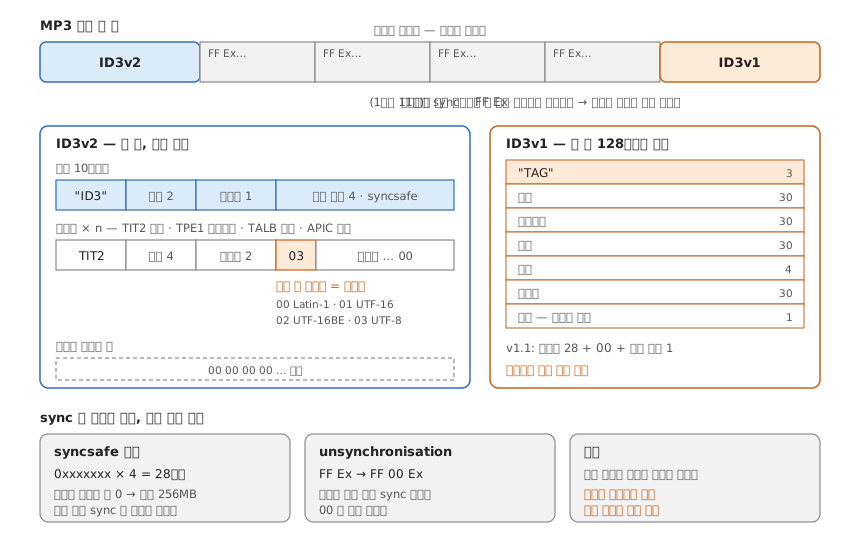
Footnotes
import sharp from 'sharp'
import fg from 'fast-glob'

const entries = await fg('./**/*.png')

for (const entry of entries) {
  const trimmedBuffer = await sharp(entry).trim().toBuffer()
  const trimmedImage = sharp(trimmedBuffer)
  const trimmedMetadata = await trimmedImage.metadata()

  trimmedImage
    .resize({
      width: Math.round(trimmedMetadata.width / 2),
      height: Math.round(trimmedMetadata.height / 2),
    })
    .png()
    .toFile('output.png')
}
offset(top, left)값, 이미지 사이즈 설정으로 crop 구현이 가능하다
sharp('img.png')
  .extract({
    left: 50,
    top: 50,
    width: 200,
    height: 400
})이미지 다운로드 구현. 이미지 응답값을 buffer로 변환해서 파일쓰기로 저장한다.
const fs = require('fs')
const util = require('util')
const fetch = require('node-fetch')

const writeFile = util.promisify(fs.writeFile)
const mkdir = util.promisify(fs.mkdir)

const FOLDER_PATH = 'FOLDER_PATH'

async function download({ url }) {
  const response = await fetch(url)
  const buffer = Buffer.from(await response.arrayBuffer())

  if (!fs.existsSync(FOLDER_PATH)) {
    await mkdir(FOLDER_PATH)
  }

  await writeFile(url, buffer)
}- Node.js Child Processes: Everything you need to know1
- The definitive Node.js handbook
- Tao of Node - Design, Architecture & Best Practices
- Useful Built-in Node.js APIs
glob
- GitHub - isaacs/node-glob
- GitHub - mrmlnc/fast-glob
- GitHub - sindresorhus/globby
- GitHub - SuperchupuDev/tinyglobby
Footnotes
-
spawn(), exec(), execFile(), fork() ↩
const formData = new FormData();
const single = document.querySelector('input[type="file"]');
const multiple = document.querySelector('input[type="file"][multiple]');

formData.append('single', single.files[0]);

[...multiple].forEach((file, index) => {
  formData.append(`multiple_${index}`, file);
})

fetch('https://example.com/posts', {
  method: 'POST',
  body: formData,
})