• navigate(-1)의 위험성: 브라우저 히스토리에서 이전 위치로 이동, 앱 내부 네비게이션과 혼란을 초래할 수 있음
  • 대신 Link 컴포넌트의 state 속성을 활용하여 안전하게 앱 내에서의 “Back” 네비게이션 구현 가능
  • 사용자에게 현재 URL을 반환하는 커스텀 훅 useCurrentURL 구현 및 재사용의 용이성을 제공하는 useBackNavigation 훅 정의
function PreserveStateLink(props) {
  const location = useLocation()
  const currentURL = location.pathname + location.search

  return (
    <Link state={{ back: currentURL }} {...props}>
      {children}
    </Link>
  )
}

function BackLink() {
  const navigate = useNavigate()
  const location = useLocation()

  const handleClick: LinkProps['onClick'] = (e) => {
    const back = location.state?.back

    if (back) {
      e.preventDefault()

      navigate(back)
    }
  }

  return (
    <Link to="/todos" onClick={handleBack}>
      Back
    </Link>
  )
}
#373

Navigation API 이탈 방지의 두 갈래 — 사전 차단과 사후 롤백

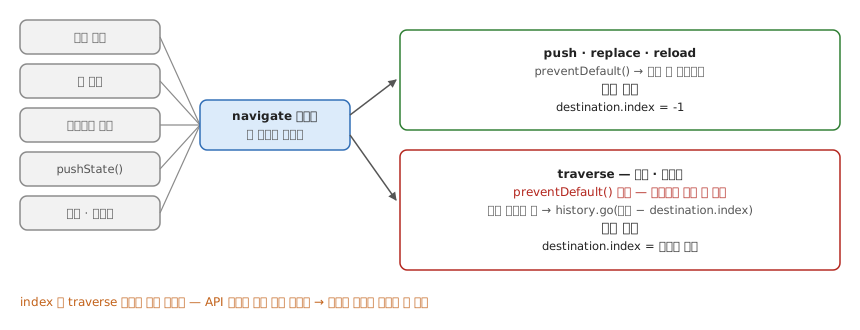
언제: Navigation API로 만든 라우터에 이탈 방지(저장 안 된 폼에서 “정말 나가시겠습니까”)를 붙일 때.

링크 클릭·폼 제출·프로그램 호출·history.pushState()·뒤로·앞으로까지 떠나는 모든 경로가 navigate 이벤트 하나로 모인다. 블로커가 켜져 있을 때 navigationType 이 push·replace·reload 면 preventDefault() 로 아예 안 움직이게 막는다(사전 차단) — 이때 destination.index 는 -1 이다. traverse(뒤로·앞으로)는 사용자를 사이트에 가둘 수 없도록 preventDefault() 로 취소할 수 없어 이미 움직인 뒤다. 그래서 history.go(현재 index − destination.index) 로 되돌린다(사후 롤백) — destination.index 는 traverse 일 때만 목적지 커서 값을 준다. API 자체가 같은 선을 긋고 있어 블로커 하나로 통일할 수 없고 라우터 안에 두 갈래가 남는다.

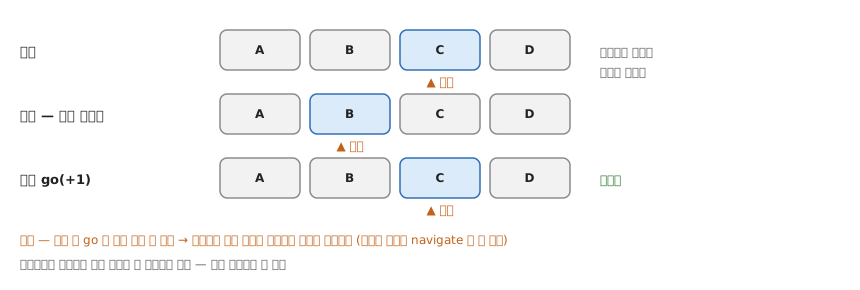
history 를 리스트와 커서로 보면 go(n) 은 리스트를 건드리지 않고 커서만 옮긴다. 커서가 C 에 있을 때 사용자가 뒤로 가면 커서가 B 로 이미 옮겨지고, 롤백 go(+1) 이 커서를 C 로 돌려놓는다 — 리스트는 그대로라 겉보기엔 아무 일도 없었던 것처럼 된다. 다만 롤백은 범위 안에서만 제자리다: 0 ≤ idx + n 을 벗어나는 go 는 아무 일도 하지 않으니, 일어나지도 않은 이동을 되돌리면 오히려 진짜로 움직인다. 이 패턴에선 이동이 없으면 navigate 가 안 떠 롤백을 부를 일이 없다. 브라우저가 사용자를 위해 막아둔 걸 되돌리는 우회라 정말 붙잡아야 할 때만 쓴다.

근거 — 뒤로·앞으로는 취소할 수 없도록 설계됐고1, destination.index 는 traverse 일 때만 값이 있다.2

확인: 블로커를 켠 채 다섯 가지 이동을 다 해본다. push·replace·reload는 아예 안 움직이고, 뒤로·앞으로는 움직였다 제자리로 돌아오면 된 것이다.

Footnotes

  1. “it will fire for all types of navigations, whether the user performed an action (such as clicking a link, submitting a form, or going back and forward) or when navigation is triggered programmatically” / “you can’t cancel a navigation via preventDefault() if the user is pressing the Back or Forward buttons in their browser; you should not be able to trap your users on your site.” (Navigation API — Chrome for Developers) ↩

  2. “Returns the index value of the destination NavigationHistoryEntry if the NavigateEvent.navigationType is traverse, or -1 otherwise.” (NavigationDestination.index — MDN) ↩
#555