요청 본문은 한 번만 읽을 수 있다.1 누가 미리 읽었는지는 읽기 메서드를 Proxy 로 감싸서 찾는다.
const bodyReadingMethods = ['arrayBuffer', 'blob', 'formData', 'text', 'json']

bodyReadingMethods.forEach((methodName) => {
  request[methodName] = new Proxy(request[methodName], {
    apply(...args) {
      console.trace(`Premature "request.${methodName}" call!`)
      return Reflect.apply(...args)
    },
  })
})
https://redd.one/blog/debugging-like-a-pro-xy
Footnotes
-
Using the Fetch API - MDN: “if any content has been read from the stream, then the stream is disturbed, and nothing else can read from the stream.” / “This means it’s not possible to read the same response (or request) body more than once” ↩
URL의 공백이 %2520으로 깨져 들어온다. 원인은 iOS 17.0/17.1 WebKit pasteboard가 복사할 때 URL을 다시 인코딩하는 버그(WebKit Bug 261936)였다. Claude Code라면 깨진 값 해독 → 경로 좁히기 → 우리 코드 배제 → 방어 → 방어 확인 순으로 간다.
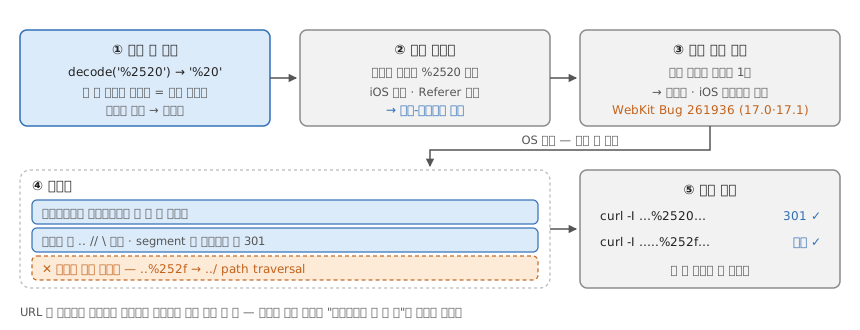
1. 깨진 값을 해독한다
decodeURIComponent('%2520')을 한 번 돌리면 %20이 남는다 — %25(= %) 뒤에 원래의 20, 두 번 인코딩된 것이다. 같은 URL의 한글(%EC%88%98)은 한 번 디코딩으로 풀리니 공백만 다시 인코딩됐다. URL 인코딩은 멱등이 아니다.
2. 어느 경로에서 깨지나
서버 액세스 로그에서 %2520이 든 요청만 모아 User-Agent·Referer를 센다. iOS에 몰려 있고 Referer가 비어 있다 — 링크 클릭(JS redirect)이 아니라 주소를 복사해 붙여넣은 경로다. 클릭 경로의 같은 URL은 정상이다.
3. 우리 코드인가, 밖인가
링크를 만드는 코드에서 encodeURIComponent 호출을 찾아 출력이 %20 한 번인지 본다. 한 번이면 이중 인코딩은 우리 밖에서 일어난다. iOS 버전으로 좁혀 검색하면 WebKit Bug 261936이 나온다.
- iOS 16↓:
NSURL URLWithString:이 invalid char에nil - iOS 17.0/17.1: invalid char를 자동 percent-encode (regression)
- iOS 17.2: 수정
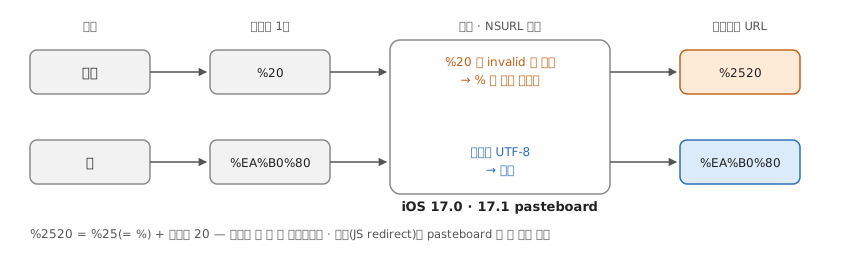
4. 고칠 수 없으니 막는다
원인이 OS 버그면 추적보다 방어가 싸다.
- 화이트리스트 라우트 패턴에서만 한 번 더 디코딩
- 디코딩 후 위험 패턴(
..,//,\) 차단 - segment별
encodeURIComponent후 301 redirect
무조건 이중 디코딩 금지 — ..%252f..%252f → ../../ path traversal 우회 벡터.
5. 방어를 확인한다
%2520이 든 URL과 ..%252f..%252f가 든 URL을 curl -I로 보낸다. 앞의 것은 301로 정상 경로에 가고, 뒤의 것은 막혀야 한다.
교훈
- URL은 디코딩된 원본으로 보관하고, 인코딩은 출력 직전 한 번 (single source of truth)
- “방어적으로 한 번 더”가 함정 — 멱등이 아닌 연산엔 통하지 않는다
참고
dnd-kit drop 직후 튕김 — setQueryData 는 화면을 한 틱 늦게 바꾼다
dnd-kit Sortable + react-query에서 drop 직후 아이템이 원래 자리로 돌아갔다가 새 자리로 점프한다. 1~2프레임짜리 튕김이고 onDragEnd에서 setQueryData로 즉시 캐시를 갱신해도 그대로다.
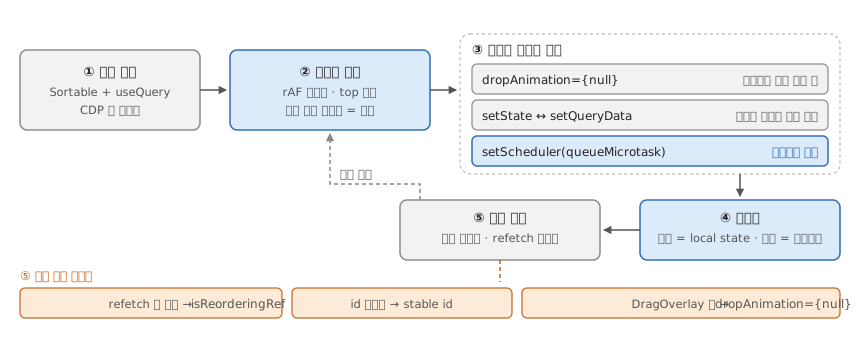
③에서 확정되는 원인 — drop 애니메이션은 놓는 즉시 목적지를 재는데1, setQueryData의 리렌더는 notifyManager의 setTimeout(0)을 거쳐 한 틱 늦다.2
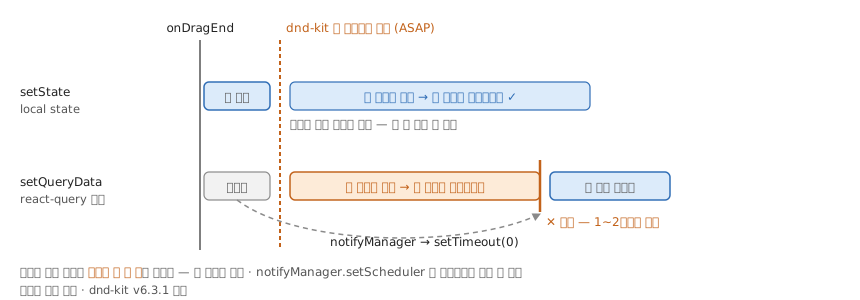
④의 코드:
function SortableList() {
  const { data: serverItems = [] } = useQuery({
    queryKey: ['items'],
    queryFn: fetchItems,
  })
  const [items, setItems] = useState<Item[]>(serverItems)

  const isReorderingRef = useRef(false)
  useEffect(() => {
    if (!isReorderingRef.current) setItems(serverItems)
  }, [serverItems])

  const reorderMutation = useMutation({
    mutationFn: reorderItems,
    onSettled: () => {
      isReorderingRef.current = false
      queryClient.invalidateQueries({ queryKey: ['items'] })
    },
  })

  const handleDragEnd = ({ active, over }: DragEndEvent) => {
    if (!over || active.id === over.id) return
    const next = arrayMove(items, idxOf(active.id), idxOf(over.id))
    isReorderingRef.current = true
    setItems(next)
    reorderMutation.mutate(next)
  }
  // <DndContext onDragEnd={handleDragEnd}> <SortableContext items={items.map(i=>i.id)}> ...
}
라이브러리가 렌더 직후 DOM을 재면, 기준은 상태가 바뀌는 시점이 아니라 화면이 바뀌는 시점이다.
@dnd-kit/corev6.3.1 기준. 새 패키지@dnd-kit/react는OptimisticSortingPlugin이 기본 활성화라 기제가 다르다 → 재검증 필요.3
Footnotes
-
“the drop animation for DragOverlay measures the destination position ASAP, and so it catches the 1 or 2 frames before my reorder is applied, and the item animates back to its original position.” (dnd-kit #833) ↩
-
notifyManager.schedule은 “Schedules a function to be run on the next batch. By default, the batch is run with asetTimeout, but this can be configured viasetScheduler.” —setScheduler로queueMicrotask·requestAnimationFrame으로 바꿀 수 있다. (notifyManager — TanStack Query) ↩ -
“The
OptimisticSortingPluginis enabled by default for all sortable items. It optimistically reorders DOM elements during a drag so the UI feels responsive without requiring React re-renders on everydragoverevent.” —@dnd-kit/sortable은 v10 도@dnd-kit/core^6.3 위의 옛 계열이라 이 플러그인이 없다. (Sortable state management — dnd kit) ↩
CORS error 원인 찾기
| 언제 | 왜 |
|---|---|
Console·Network 에 CORS error |
preflight 에 Access-Control-Allow-Origin(ACAO) 이 없으면 브라우저는 5xx·404·타임아웃을 전부 CORS 로 뭉갠다1 |
preflight 가 server: awselb/2.0 의 5xx |
LB 가 직접 만든 응답이다 — 앱 응답이 아니니 CORS 헤더가 붙을 수 없다 |
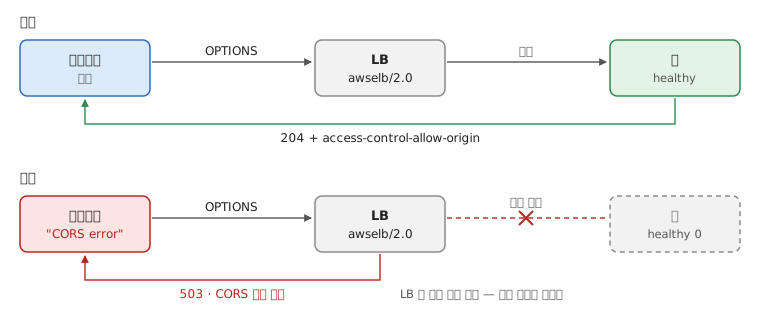
preflight 의 status 와 server 헤더 둘로 가른다.
| preflight | server | ACAO | 갈래 | 원인 |
|---|---|---|---|---|
503 |
awselb/2.0 | 없음 | 인프라 | 등록된 target 02 — 서비스 다운·배포 실패·CrashLoop |
502 |
awselb/2.0 | 없음 | 인프라 | 타깃이 끊거나 잘못 응답 — 크래시·OOM·포트 불일치 |
504 |
awselb/2.0 | 없음 | 인프라 | LB idle timeout 초과 — 느린 쿼리·외부 연동 지연 |
404 |
앱 | 없음 | 경로 | path 오타, ingress rule 불일치 |
204·200 |
앱 | 없음 | CORS | CORS 미설정 |
204 |
앱 | 있음 | CORS | access-control-allow-headers 에 요청 헤더가 빠짐 |
204 |
앱 | * |
CORS | credentials: 'include' 와 * 는 병용 불가 — 오리진을 명시한다 |
204 |
앱 | 정상 | 정상 | CORS 아님. 본 요청의 본문·인증·에러를 본다 |
Footnotes
-
CORS errors — MDN: “For security reasons, specifics about what went wrong with a CORS request are not available to JavaScript code. All the code knows is that an error occurred.” ↩
-
ALB 트러블슈팅 — HTTP 503: “The target groups for the load balancer have no registered targets, or all of the registered targets are in an unused state.” 전부 unhealthy 면 503 이 아니라 그대로 보낸다 — health checks: “If a target group contains only unhealthy registered targets, the load balancer routes requests to all those targets, regardless of their health status.” ↩
localtunnel은 로컬 포트에 공개 URL 을 붙인다 — 배포나 DNS 설정 없이 남에게 보여주거나 외부 콜백(웹훅)을 받을 때.1
app.listen(PORT, async () => {
  const tunnel = await localtunnel({
    port: PORT,
    subdomain: name,
  })
})
하지만 너무 느려서 ngrok 쓰는게 현실적일수도 있겠다. -20220917
Footnotes
-
localtunnel README: “localtunnel exposes your localhost to the world for easy testing and sharing! No need to mess with DNS or deploy just to have others test out your changes.” ↩
-
로컬 환경에서 웹훅 테스트를 위해, API 엔드포인트를 만들고 localtunnel이나 ngrok을 사용하기. ↩
charles
- The Android Emulator and Charles Proxy: A Love Story | by Mark Dappollone | Medium
- Is it possible to rewrite a status code with Charles Proxy? - Stack Overflow
fiddler
mitmproxy
- mitmproxy로 iOS 기기의 네트워크 트래픽 살펴보기 :: Outsider’s Dev Story
- Android nougat 이상 emulator에서 mitmproxy 사용하기 | by Jungwook Park | kjcoop | Medium