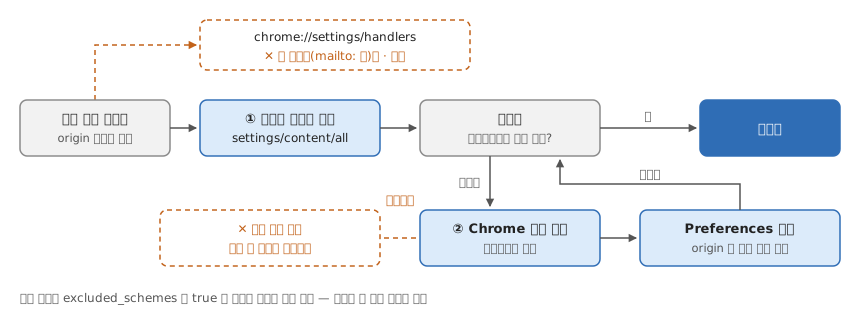
-- 설정 UI 에는 항목이 없다 — 체크는 프로필의 Preferences JSON 에 origin 단위로 저장된다
-- Preferences 의 protocol_handler.allowed_origin_protocol_pairs
type Allowed = Map Origin (Map Scheme Bool)

allowAlways :: Origin -> Scheme -> Allowed -> Allowed   -- 다이얼로그의 "항상 열기"
allowAlways o s = insertWith union o (singleton s True)

reset :: Origin -> Scheme -> Allowed -> Allowed         -- 설정 UI 에는 이 함수가 없다
reset o s = adjust (delete s) o

-- ① chrome://settings/content/all 에서 사이트 데이터 삭제 — 이걸로 풀리면 끝
-- ② 안 풀리면 Chrome 을 백그라운드까지 끄고 파일에서 reset, 재시작
quit :: Allowed -> Allowed -> Allowed
quit memory _disk = memory                              -- 실행 중에 고치면 종료 때 덮인다

-- 재시작 뒤 다이얼로그가 다시 뜨면 풀린 것이다

prefs :: OS -> Profile -> FilePath
prefs MacOS   p = "~/Library/Application Support/Google/Chrome" </> p </> "Preferences"
prefs Windows p = "%LOCALAPPDATA%\\Google\\Chrome\\User Data" </> p </> "Preferences"
prefs Linux   p = "~/.config/google-chrome" </> p </> "Preferences"