useMemo 캐시 적중 진단 — 매 렌더 새로 만들어지는 deps
무거운 계산을 useMemo로 감쌌는데 렌더 시간이 줄지 않는다. 각 단계는 질문 하나에 답하고, 그 답이 다음 질문을 만든다. 단계마다 추론이 아니라 관찰로 넘어간다.
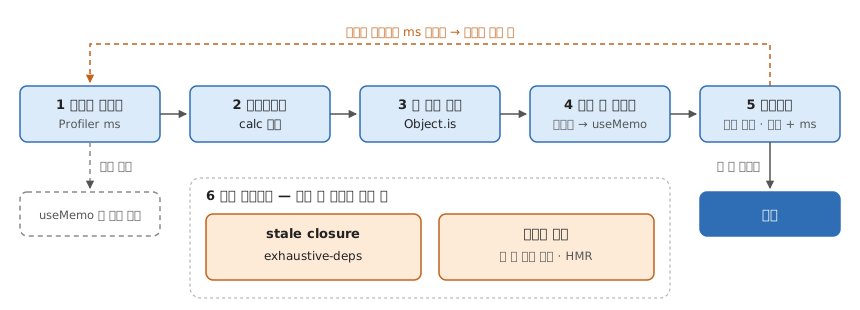
1. 정말 이 계산이 느린가
React DevTools Profiler로 조작 하나를 녹화하고, flamegraph에서 그 컴포넌트의 렌더 시간(ms)을 본다. 여기서 이 컴포넌트가 병목이 아니면 useMemo를 볼 이유가 없다. 이 숫자는 5에서 수정 전후를 비교할 기준선이 된다.
2. 정말 재사용되고 있나
계산 함수 안에 카운터를 넣고 리렌더를 몇 번 일으킨다.
const rows = useMemo(() => {
  console.count('calc')
  return items.filter(fn)
}, [items])calc가 렌더와 같이 늘어나면 한 번도 재사용되지 않고 있다. 개발 모드에서는 React가 계산 함수를 일부러 두 번 부르므로1 렌더당 2씩 뛰는 게 정상이다 — 보는 건 절대값이 아니라 렌더를 따라 늘어나는지다.
CDP로 읽을 때. Runtime.enable 뒤 Runtime.consoleAPICalled가 type: "count"로 온다. 숫자는 따로 오지 않고 args[0].value에 "calc: 3" 같은 문자열 하나로 오므로 /: (\d+)$/로 꺼낸다. console.countReset은 이벤트를 내지 않는다. Runtime.enable 전에 찍힌 메시지도 enable 시점에 다시 보내준다.2
코드를 고치지 않고 셀 때. 앱에 로그를 심을 수 없으면 V8 커버리지의 호출 횟수를 쓴다.
await send('Profiler.enable')
await send('Profiler.startPreciseCoverage', { callCount: true, detailed: true })
// 리렌더 한 번 일으키고
const { result } = await send('Profiler.takePreciseCoverage')
// result[].functions[].ranges[0].count = 그 사이 호출 횟수takePreciseCoverage는 부를 때마다 카운터를 0으로 되돌린다.2 리렌더마다 한 번씩 부르면 그 렌더 동안의 호출 횟수가 바로 나온다. 다만 useMemo(() => …)의 화살표 함수는 functionName이 비어 있어 스크립트 url과 ranges 오프셋으로 찾아야 하고(번들이면 소스맵으로 되짚는다), 개발 모드의 두 번 호출도 그대로 세어진다.
3. 왜 매번 다시 계산하나
계산 쪽이 아니라 deps를 의심한다. React는 재료 안을 들여다보지 않고 Object.is로 같은 물건인지만 본다.1 매 렌더 새로 만들어지는 값이 deps에 있으면 내용이 같아도 매번 “다른 재료”다.
의심만 하지 말고 참조가 실제로 바뀌는지 찍는다.
const prev = useRef(items)
useEffect(() => {
  console.log('items same?', Object.is(prev.current, items))
  prev.current = items
})
매 렌더 false면 확정이다. Profiler 설정의 “Record why each component rendered while profiling”을 켜면 코드 없이 Props changed: items로도 보인다.
4. 누가 새 참조를 만드나
같은 비교를 부모 쪽에 두고 거슬러 올라간다. 렌더 중에 새 배열을 만들어 넘기고 있었다.
<List items={data.map(transform)} />넘기는 쪽에서 참조를 붙잡아 둔다.
const items = useMemo(() => data.map(transform), [data])Footnotes
-
“React will compare each dependency with its previous value using the
Object.iscomparison.” / “React will not throw away the cached value unless there is a specific reason to do that … This should be fine if you rely onuseMemosolely as a performance optimization.” / “In Strict Mode, React will call your calculation function twice in order to help you find accidental impurities.” (useMemo — React) ↩ ↩2 -
Chrome 154 headless 에서 원시 CDP 로 실측 (2026-09-30).
console.count('calc')세 번 →"calc: 1"·"calc: 2"·"calc: 3",countReset뒤 다시"calc: 1". 커버리지는 3회 호출 뒤take→ 3, 2회 더 호출 뒤take→ 2. ↩ ↩2
렌더 흐름에서 규칙이 걸리는 자리
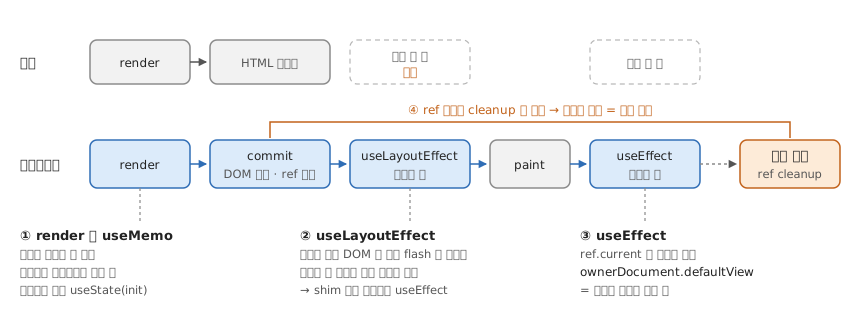
① render — 유지돼야 하는 값은 useMemo 가 아니라 state
useMemo(getRandomColors, []) 로 만든 값이 HMR 뒤에 바뀐다.1
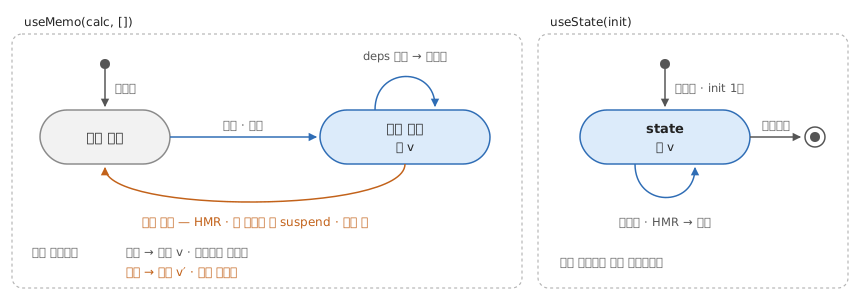
const resolved = resolveTheme(mode, systemDark) // 순수 파생은 그냥 계산
const [colors] = useState(getRandomColors) // 유지가 곧 correctness 면 state
② useLayoutEffect — 서버 경고는 shim 으로 (React 18 이하)2
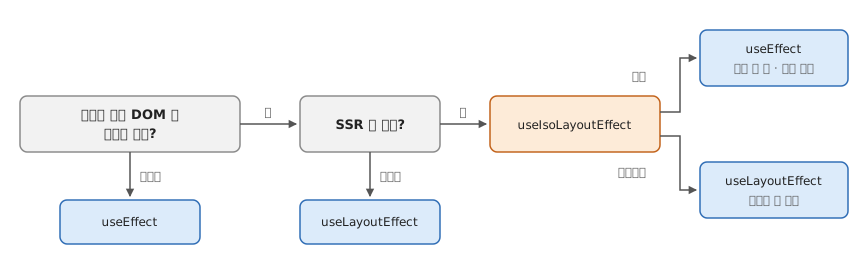
const useIsoLayoutEffect =
  typeof window !== 'undefined' ? useLayoutEffect : useEffect
③ useEffect — 이벤트는 노드가 사는 window 에
window.open·포털로 다른 창에 렌더해도 window.addEventListener 는 원래 창을 듣는다.3
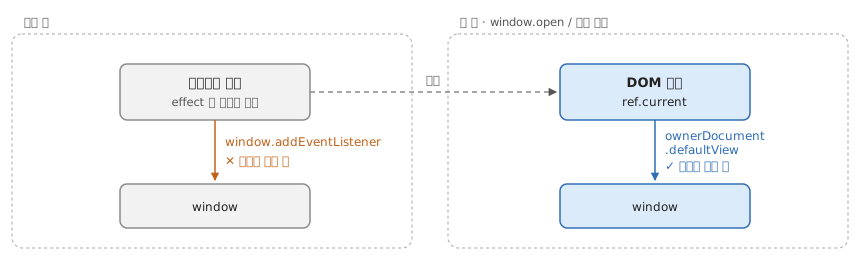
const win = ref.current?.ownerDocument.defaultView ?? window멀티윈도우로 쓰일 수 있는 라이브러리 컴포넌트에만 필요하다.
④ ref 콜백 — cleanup 을 반환한다 (React 19)4
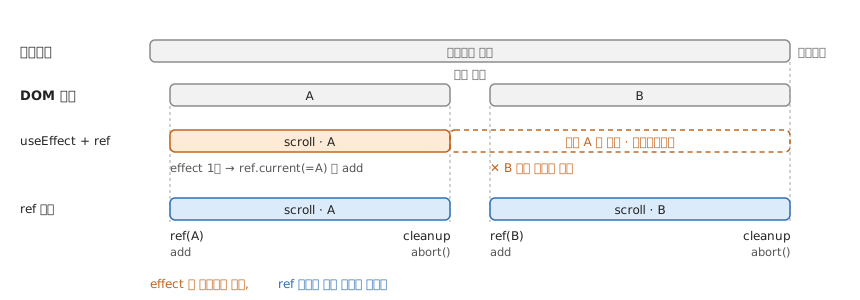
<div
  ref={(node) => {
    const ctrl = new AbortController()
    node.addEventListener('scroll', onScroll, { signal: ctrl.signal })
    return () => ctrl.abort()
  }}
/>
Footnotes
-
“For example, in development, React throws away the cache when you edit the file of your component. Both in development and in production, React will throw away the cache if your component suspends during the initial mount.” / “This should be fine if you rely on
useMemosolely as a performance optimization. Otherwise, a state variable or a ref may be more appropriate.” / “In the future, React may add more features that take advantage of throwing away the cache—for example, if React adds built-in support for virtualized lists in the future, it would make sense to throw away the cache for items that scroll out of the virtualized table viewport.” (useMemo — React) ↩ -
React 19.0.0 에서 경고가 빠졌다 — “Remove layout effect warning on server” (CHANGELOG — React 19.0.0) ↩
-
ownerDocument는 “returns the top-level document object of the node”,defaultView는 “returns the window object associated with a document, ornullif none is available.” (Node.ownerDocument — MDN · Document.defaultView — MDN) ↩ -
“When that
<div>DOM node is removed, React will call your the cleanup function returned from the callback.” / “React 19 added cleanup functions for ref callbacks.” (Common components — React) ↩