dnd-kit drop 직후 튕김 — setQueryData 는 화면을 한 틱 늦게 바꾼다
dnd-kit Sortable + react-query에서 drop 직후 아이템이 원래 자리로 돌아갔다가 새 자리로 점프한다. 1~2프레임짜리 튕김이고 onDragEnd에서 setQueryData로 즉시 캐시를 갱신해도 그대로다.
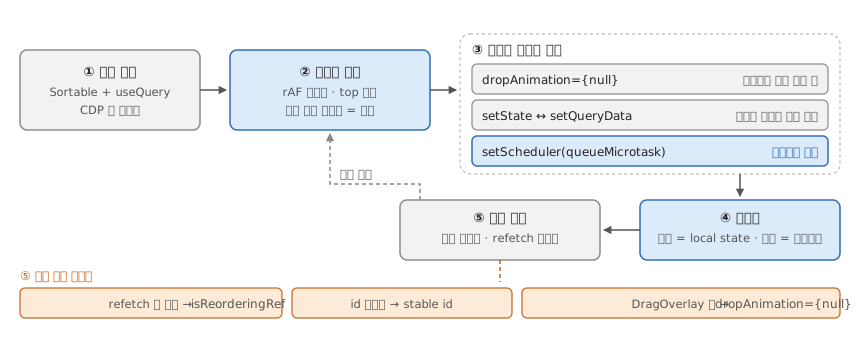
③에서 확정되는 원인 — drop 애니메이션은 놓는 즉시 목적지를 재는데1, setQueryData의 리렌더는 notifyManager의 setTimeout(0)을 거쳐 한 틱 늦다.2
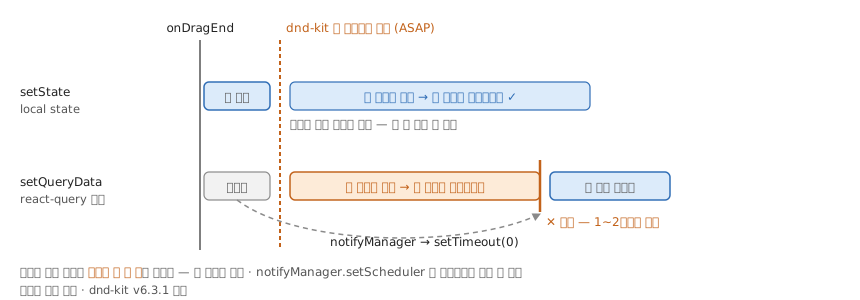
④의 코드:
function SortableList() {
  const { data: serverItems = [] } = useQuery({
    queryKey: ['items'],
    queryFn: fetchItems,
  })
  const [items, setItems] = useState<Item[]>(serverItems)

  const isReorderingRef = useRef(false)
  useEffect(() => {
    if (!isReorderingRef.current) setItems(serverItems)
  }, [serverItems])

  const reorderMutation = useMutation({
    mutationFn: reorderItems,
    onSettled: () => {
      isReorderingRef.current = false
      queryClient.invalidateQueries({ queryKey: ['items'] })
    },
  })

  const handleDragEnd = ({ active, over }: DragEndEvent) => {
    if (!over || active.id === over.id) return
    const next = arrayMove(items, idxOf(active.id), idxOf(over.id))
    isReorderingRef.current = true
    setItems(next)
    reorderMutation.mutate(next)
  }
  // <DndContext onDragEnd={handleDragEnd}> <SortableContext items={items.map(i=>i.id)}> ...
}
라이브러리가 렌더 직후 DOM을 재면, 기준은 상태가 바뀌는 시점이 아니라 화면이 바뀌는 시점이다.
@dnd-kit/corev6.3.1 기준. 새 패키지@dnd-kit/react는OptimisticSortingPlugin이 기본 활성화라 기제가 다르다 → 재검증 필요.3
Footnotes
-
“the drop animation for DragOverlay measures the destination position ASAP, and so it catches the 1 or 2 frames before my reorder is applied, and the item animates back to its original position.” (dnd-kit #833) ↩
-
notifyManager.schedule은 “Schedules a function to be run on the next batch. By default, the batch is run with asetTimeout, but this can be configured viasetScheduler.” —setScheduler로queueMicrotask·requestAnimationFrame으로 바꿀 수 있다. (notifyManager — TanStack Query) ↩ -
“The
OptimisticSortingPluginis enabled by default for all sortable items. It optimistically reorders DOM elements during a drag so the UI feels responsive without requiring React re-renders on everydragoverevent.” —@dnd-kit/sortable은 v10 도@dnd-kit/core^6.3 위의 옛 계열이라 이 플러그인이 없다. (Sortable state management — dnd kit) ↩