폼 제출 시 FormData 테스트
test('폼 제출 시 formData 확인', () => {
  const handleSubmit = jest.fn((e: React.FormEvent<HTMLFormElement>) => {
    e.preventDefault()
    const formData = new FormData(e.target as HTMLFormElement)
    const data = Object.fromEntries(formData.entries())
    expect(data).toEqual({ username: 'testuser', password: 'password' })
  })

  render(<LoginForm onSubmit={handleSubmit} />)

  fireEvent.change(screen.getByPlaceholderText('아이디'), {
    target: { value: 'testuser' },
  })
  fireEvent.change(screen.getByPlaceholderText('비밀번호'), {
    target: { value: 'password' },
  })
  fireEvent.click(screen.getByRole('button', { name: '로그인' }))

  expect(handleSubmit).toHaveBeenCalled()
})AuthContext 테스트 패턴
// localStorage 함수 테스트
vi.spyOn(Storage.prototype, 'getItem').mockImplementation((key) => {
  if (key === 'auth_token') return 'test_token'
  return null
})

// AuthProvider 상태 테스트
const TestComponent = () => {
  const { token, login, logout } = useAuth()

  return (
    <div>
      <p data-testid="token">{token || 'null'}</p>
      <button onClick={() => login('test_token')}>Login</button>
      <button onClick={logout}>Logout</button>
    </div>
  )
}

// useAuth 훅 테스트
it('AuthProvider 외부에서 호출하면 에러', () => {
  expect(() => renderHook(() => useAuth())).toThrowError()
})

it('AuthProvider 내부에서 정상 동작', () => {
  const wrapper = ({ children }) => <AuthProvider>{children}</AuthProvider>
  const { result } = renderHook(() => useAuth(), { wrapper })
  expect(result.current).toHaveProperty('token', null)
})Vitest/Jest Fake Timers로 시간 제어
describe('time-dependent tests', () => {
  beforeEach(() => {
    vi.useFakeTimers() // jest.useFakeTimers()
  })

  afterEach(() => {
    vi.useRealTimers() // jest.useRealTimers()
  })

  it('특정 시간에 동작 확인', () => {
    vi.setSystemTime(new Date(2000, 1, 1, 13)) // 13시 설정
    expect(purchase()).toEqual({ message: 'Success' })
  })

  it('영업시간 외 동작', () => {
    vi.setSystemTime(new Date(2000, 1, 1, 19)) // 19시 설정
    expect(purchase()).toEqual({ message: 'Error' })
  })
})
@sinonjs/fake-timers 기반. Date, setTimeout 등 모킹.1
Footnotes
-
vi - Vitest: “The implementation is based internally on
@sinonjs/fake-timers.” / The Jest Object: “Fake timers implementation is backed by@sinonjs/fake-timers.” ↩
Jest setupFiles vs setupFilesAfterEnv - 실행 시점이 다르다.
- setupFiles: 테스트 프레임워크 설치 전.
expect·beforeEach가 아직 없다(jest객체는 있다). 환경 변수, 폴리필용. - setupFilesAfterEnv: 테스트 프레임워크 설치 후.
jest.setTimeout(), 커스텀 matcher, 전역beforeEach용.
process.env는 setupFiles에 둔다(용도 구분). 다만 둘 다 테스트 코드보다 먼저 돌아서, setupFilesAfterEnv에서 설정해도 테스트 파일이 import 하는 모듈에는 보인다.1
// jest.config.js
{ setupFiles: ['./jest.env.js'], setupFilesAfterEnv: ['./jest.setup.js'] }

// jest.env.js - 환경 변수
process.env.API_URL = 'http://test-api.example.com'

// jest.setup.js - Jest API 활용
import '@testing-library/jest-dom'
beforeEach(() => { jest.clearAllMocks() })
Footnotes
-
Configuring Jest — setupFilesAfterEnv: “Since setupFiles executes before the test framework is installed in the environment, this script file presents you the opportunity of running some code immediately after the test framework has been installed in the environment but before the test code itself.” ↩
Vitest 모킹: vi.mocked() vs vi.hoisted()
vi.mocked()는 타입만 제공, 실제 모킹 구현체는 별도로 필요.1
// ❌ mockImplementation이 undefined
const mockUseSize = vi.mocked(useSize)

// ✅ vi.hoisted() 사용 (추천)
const mockUseSize = vi.hoisted(() => vi.fn())

vi.mock('ahooks', () => ({ useSize: mockUseSize }))

beforeEach(() => {
  mockUseSize.mockImplementation(() => ({ width: 100, height: 20 }))
})
DOM 속성 모킹 (scrollWidth/clientWidth):
beforeEach(() => {
  Object.defineProperty(HTMLElement.prototype, 'scrollWidth', {
    configurable: true,
    get() {
      return 150
    },
  })
})

afterEach(() => {
  // 원래 속성 복원
})
DOM 측정이 복잡하면 Playwright/Cypress로 통합 테스트 고려.
Footnotes
-
vi.mocked - Vitest: “Type helper for TypeScript. Just returns the object that was passed.” ↩
RTL에서 overflow scroll 상태 테스트 — 실제 브라우저(Vitest browser mode·Playwright)에서만 돈다. jsdom 은 레이아웃을 하지 않아 scrollWidth·clientWidth 가 0 이라 아래에서 true 를 기대하는 단언이 둘 다 실패한다.1
// scrollWidth > clientWidth면 가로 스크롤 필요
const isOverflowScrollable = (el) => ({
  horizontal: el.scrollWidth > el.clientWidth,
  vertical: el.scrollHeight > el.clientHeight,
})

test('overflow 확인', () => {
  render(<ScrollableComponent parentWidth={300} childWidth={500} />)

  const parent = screen.getByTestId('parent-container')

  expect(isOverflowScrollable(parent).horizontal).toBe(true)
})

test('동적 크기 변경', () => {
  const { rerender } = render(<Comp parentWidth={400} childWidth={300} />)

  expect(isOverflowScrollable(screen.getByTestId('parent')).horizontal).toBe(
    false
  )

  rerender(<Comp parentWidth={400} childWidth={600} />)

  expect(isOverflowScrollable(screen.getByTestId('parent')).horizontal).toBe(
    true
  )
})
jsdom 에서 돌려야 하면 515 처럼 Object.defineProperty 로 scrollWidth·clientWidth 를 모킹한다. getBoundingClientRect() 도 jsdom 에선 전부 0이다.
Footnotes
-
jsdom README — Unimplemented parts of the web platform: “Layout: the ability to calculate where elements will be visually laid out as a result of CSS, which impacts methods like
getBoundingClientRects()or properties likeoffsetTop.” / “Currently jsdom has dummy behaviors for some aspects of these features, such as … returning zeros for many layout-related properties.” ↩
SPA 메모리 누수 soak test
Soak 테스트는 일반적인 프로덕션 부하를 사용하여 연속 가용성 기간 동안 시스템 동작을 프로덕션 사용 환경에서 검증하기 위한 시스템 테스트 유형입니다.1
SPA 메모리 누수는 시작 화면과 끝 화면이 같은 플로우를 반복해서 잡는다. SPA는 페이지를 새로고침하지 않아 서버와 같은 상황이어서 한 플로우를 동일한 브라우저 컨텍스트 안에서 수백 번 돌린다.
drawer 열고 닫기를 200번 돌린 뒤 리스너·노드 수가 처음보다 늘어 있으면 그게 누수다 — 같은 자리로 돌아왔는데 늘었으니까. 클릭 반복은 Playwright로, 데이터는 CDP 로 읽는다.
측정은 CDP 로 한다 — Playwright 는 Chromium 에서만 CDP 세션을 열 수 있어서 Chromium 전용이다.2
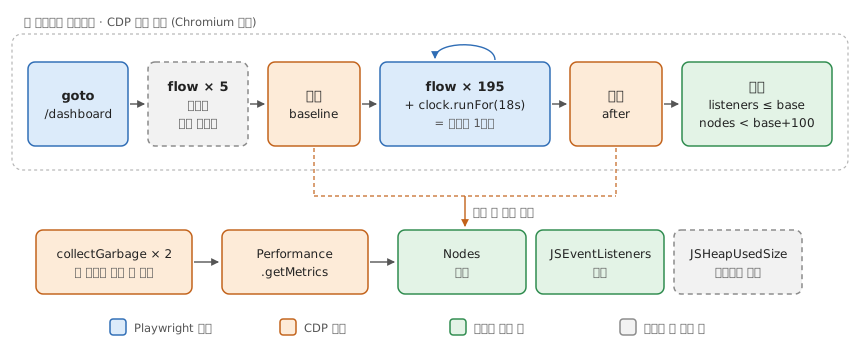
판정은 노드·리스너 수로만 한다. heap 은 앱과 무관하게 실행마다 흔들린다. 워밍업도 힙 때문이다 — 첫 루프에 코드·데이터를 받아와 힙이 뛰지만, 수는 첫 루프부터 같은 만큼 오른다.
Footnotes
-
Soak testing — Wikipedia: “Soak testing is a type of system testing with a typical production load, over a continuous availability period, to validate system behavior under production use.” ↩
-
browserContext.newCDPSession— Playwright: “CDP sessions are only supported on Chromium-based browsers.” ↩