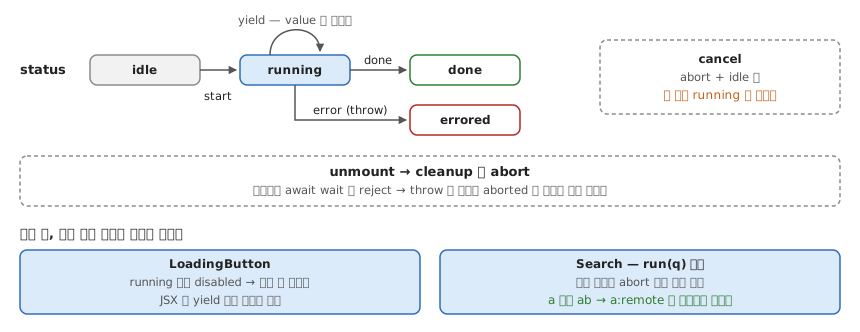
isLoading 없이, onClick 에서 yield 만 한다. 핸들러를 async generator 로 받아 훅이 for await 로 돌며 yield 할 때마다 값을 바꾼다 — setLoading → setProgress → setLoading(false) 가 시간 순서대로 한 함수에 들어간다.
import { useEffect, useReducer, useRef } from 'react'

type Status = 'idle' | 'running' | 'errored' | 'done'

type State<T> = { status: Status; value: T; error: unknown }

type Action<T> =
  | { type: 'start' }
  | { type: 'yield'; value: T }
  | { type: 'done' }
  | { type: 'error'; error: unknown }
  | { type: 'cancel' }

function reducer<T>(state: State<T>, action: Action<T>): State<T> {
  switch (action.type) {
    case 'start':
      return { ...state, status: 'running', error: null } // 상태와 에러 초기화가 한 번에 — 따로 set 하다 어긋날 일이 없다
    case 'yield':
      return { ...state, value: action.value }
    case 'done':
      return { ...state, status: 'done' }
    case 'error':
      return { ...state, status: 'errored', error: action.error }
    case 'cancel':
      return { ...state, status: 'idle' } // 없으면 'running' 에 멈춰 있다
  }
}

function useGenerator<T, A extends unknown[]>(
  fn: (signal: AbortSignal, ...args: A) => AsyncGenerator<T>, // signal 은 훅이 첫 인자로 끼워 넣는다
  initial: T,
) {
  const [state, dispatch] = useReducer(reducer<T>, {
    status: 'idle',
    value: initial,
    error: null,
  })
  const ctrlRef = useRef<AbortController | null>(null)

  useEffect(() => () => ctrlRef.current?.abort(), []) // unmount 되면 진행 중인 흐름을 끊는다

  const run = async (...args: A) => {
    // 매 렌더 새로 만들어져 항상 최신 fn 을 읽는다
    ctrlRef.current?.abort() // 재진입 — 직전 실행을 끊고 다시 시작
    const ctrl = new AbortController()
    ctrlRef.current = ctrl
    dispatch({ type: 'start' })
    try {
      for await (const value of fn(ctrl.signal, ...args)) {
        if (ctrl.signal.aborted) return
        dispatch({ type: 'yield', value }) // yield 마다 리렌더
      }
      dispatch({ type: 'done' })
    } catch (error) {
      if (ctrl.signal.aborted) return // abort 로 생긴 throw 는 에러가 아니다
      dispatch({ type: 'error', error })
    }
  }

  const cancel = () => {
    ctrlRef.current?.abort()
    dispatch({ type: 'cancel' })
  }

  return { ...state, run, cancel }
}
검색은 같은 훅에서 재진입이 재시작이 된다 — 새 입력이 들어오면 이전 tier 가 끊긴다.
async function* searchTiers(signal: AbortSignal, q: string): AsyncGenerator<string[]> {
  await wait(100, signal); yield [`${q}:local`]
  await wait(300, signal); yield [`${q}:local`, `${q}:remote`]
}

const { value, run } = useGenerator(searchTiers, [])
<input onChange={(e) => run(e.target.value)} />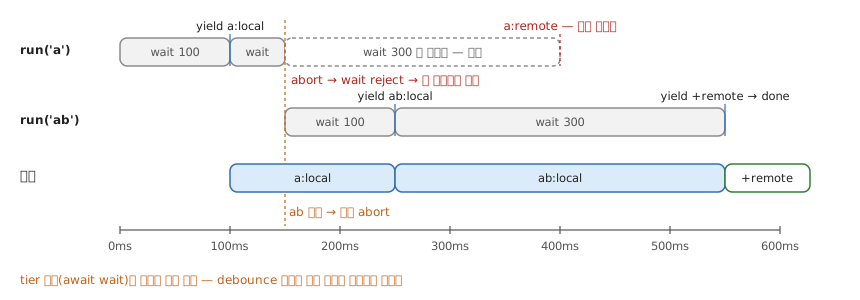
언제 — 시간이 코드의 한 방향(↓)으로만 흐를 때: 멀티 단계 loading · progressive search(tier 경계 = 취소 지점, debounce 불필요) · optimistic mutation(optimistic | reconciled | rolledBack 전이를 콜백 넷 대신 한 함수로).
확인 — 원본 데모 대비 채운 셋: ERRORED 를 선언만 하고 안 쓰던 것(→ catch), unmount 시 취소(→ AbortSignal + cleanup), 타입(→ 제네릭 훅). 검색창에 a 다음 바로 ab 를 치면 a:remote 가 끼어들지 않고 ab:local → ab:local,ab:remote 로만 바뀌면 된 것이다.
- 출처: @ericclemmons