static create 패턴 - 생성자 대신 정적 메서드로 객체 생성
언제 사용?
- 생성 로직이 복잡하거나 유효성 검사 필요
- 생성 실패 시 null/Result 반환 (생성자는 항상 인스턴스 반환)
- 팩토리 패턴, 싱글톤
class User {
  private constructor(private readonly name: string) {}

  // 유효성 검사 + 실패 시 null 반환
  static create(name: string): User | null {
    if (!name || name.length < 3) return null
    return new User(name)
  }
}

// 팩토리 패턴
class Shape {
  static create(type: 'circle' | 'rect', size: number): Shape {
    return type === 'circle' ? new Circle(size) : new Rectangle(size)
  }
}

// 싱글톤
class Config {
  private static instance: Config
  private constructor() {}
  static create() {
    return Config.instance ??= new Config()
  }
}
단순 초기화만 필요하면 일반 생성자가 더 직관적. 복잡한 생성 로직에만 사용.
Redux 스타일 Store 직접 구현 — state 는 클로저에 가두고, 바꾸는 길은 dispatch → reducer 하나뿐이다.1 Redux 와 달리 이 subscribe 는 등록 즉시 현재 state 로 한 번 부르고, 리스너에 state 를 넘긴다(Redux 리스너는 인자 없이 불리고 getState() 로 읽는다).2
type Reducer<S, A> = (state: S, action: A) => S
type Listener<S> = (state: S) => void

interface Store<S, A> {
  getState: () => S
  subscribe: (listener: Listener<S>) => () => void
  dispatch: (action: A) => A
}

function createStore<S, A>(
  reducer: Reducer<S, A>,
  preloadedState: S
): Store<S, A> {
  let currentState: S = preloadedState
  let listeners: Listener<S>[] = []

  function getState(): S {
    return currentState
  }

  function subscribe(listener: Listener<S>): () => void {
    listener(currentState)

    listeners.push(listener)

    return function unsubscribe() {
      listeners = listeners.filter((l) => l !== listener)
    }
  }

  function dispatch(action: A): A {
    currentState = reducer(currentState, action)

    listeners.forEach((listener) => {
      listener(currentState)
    })

    return action
  }

  return {
    subscribe,
    getState,
    dispatch,
  }
}

type Item = {
  body: string
}

type State = {
  items: Item[]
}

type Action = {
  type: 'ADD'
  payload: Item
}

const store = createStore<State, Action>(
  (state, action) => {
    switch (action.type) {
      case 'ADD':
        return {
          ...state,
          items: state.items.concat(action.payload),
        }
      default:
        return state
    }
  },
  {
    items: [],
  }
)

store.subscribe((state) => {
  console.log(state.items)
})

store.dispatch({
  type: 'ADD',
  payload: {
    body: 'hello',
  },
})
Footnotes
-
Store | Redux: “The only way to change the state inside it is to dispatch an action on it, which triggers the root reducer function to calculate the new state.” ↩
-
Store | Redux: “It will be called any time an action is dispatched, and some part of the state tree may potentially have changed. You may then call getState() to read the current state tree inside the callback.” ↩
React Children API - 가능하지만 비추천
암묵적 의존성, 타입 안전성 부족, 매 렌더 트리 순회, 예측 불가능
재귀 순회
function traverseReactNode(children: ReactNode, callback, typeToMatch?) {
  Children.forEach(children, (child) => {
    if (!isValidElement(child)) return
    if (child.type === Fragment) {
      traverseReactNode(child.props.children, callback, typeToMatch)
      return
    }
    if (child.type === typeToMatch) callback(child)
    if (child.props?.children) {
      traverseReactNode(child.props.children, callback, typeToMatch)
    }
  })
}
동적 래핑
const renderChildren = (children) => {
  const elements = React.Children.toArray(children)
  const hasLink = elements.some(
    (el) => React.isValidElement(el) && el.props.url
  )
  return hasLink ? children : <ul>{children}</ul>
}
// toArray는 string, number도 포함 → isValidElement 체크 필수
대안: Compound Component
// ❌ 마법처럼 동작 (예측 불가)
<Tabs>{/* 어디에 넣든 Tab 찾아줌 */}</Tabs>

// ✅ Compound Component
<Tabs.Root>
  <Tabs.List>
    <Tabs.Trigger value="a">A</Tabs.Trigger>
  </Tabs.List>
  <Tabs.Content value="a">Content</Tabs.Content>
</Tabs.Root>
React 팀도 2021년부터 Children API 사용 권장하지 않음: “Using Children is uncommon and can lead to fragile code”1
역사적 배경: 2013년엔 Context API도 없었음. “선언형”이라면서 Children API로 명령형 트리 순회 제공하는 이중성.
- react-children-utilities - deepMap, deepFind, deepFilter
Footnotes
-
Children – React: “Using Children is uncommon and can lead to fragile code.” ↩
간단한 Redux 스타일 Store 구현
type Reducer<S, A> = (state: S, action: A) => S
type Listener<S> = (state: S) => void

interface Store<S, A> {
  getState: () => S
  subscribe: (listener: Listener<S>) => () => void
  dispatch: (action: A) => A
}

function createStore<S, A>(
  reducer: Reducer<S, A>,
  preloadedState: S
): Store<S, A> {
  let currentState = preloadedState
  let listeners: Listener<S>[] = []

  return {
    getState: () => currentState,
    subscribe: (listener) => {
      listener(currentState)
      listeners.push(listener)
      return () => {
        listeners = listeners.filter((l) => l !== listener)
      }
    },
    dispatch: (action) => {
      currentState = reducer(currentState, action)
      listeners.forEach((l) => l(currentState))
      return action
    },
  }
}Maybe Monad로 null 체크 체이닝
type Maybe<T> = T | null

const Maybe = {
  of: <T>(value: T): Maybe<T> => (value != null ? value : null),
  map: <T, U>(m: Maybe<T>, fn: (v: T) => U): Maybe<U> =>
    m != null ? Maybe.of(fn(m)) : null,
}

// 사용 예: DOM 요소 찾아서 스크롤
Maybe.of(scrollElement.current)
  .map((root) => root.querySelector(`#${id}`))
  .map((target) => target.getClientRects()[0])
  .map((rect) => {
    root.scrollLeft = rect.left
  })
Generator로 early return 패턴도 가능
function* handleScroll(id) {
  const root = scrollElement.current
  if (!root) return
  const target = root.querySelector(`#${id}`)
  if (!target) return
  yield target.getClientRects()[0]?.left ?? 0
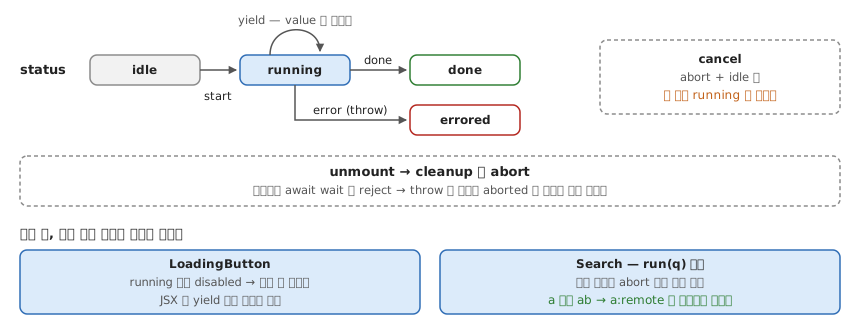
}isLoading 없이, onClick 에서 yield 만 한다. 핸들러를 async generator 로 받아 훅이 for await 로 돌며 yield 할 때마다 값을 바꾼다 — setLoading → setProgress → setLoading(false) 가 시간 순서대로 한 함수에 들어간다.
import { useEffect, useReducer, useRef } from 'react'

type Status = 'idle' | 'running' | 'errored' | 'done'

type State<T> = { status: Status; value: T; error: unknown }

type Action<T> =
  | { type: 'start' }
  | { type: 'yield'; value: T }
  | { type: 'done' }
  | { type: 'error'; error: unknown }
  | { type: 'cancel' }

function reducer<T>(state: State<T>, action: Action<T>): State<T> {
  switch (action.type) {
    case 'start':
      return { ...state, status: 'running', error: null } // 상태와 에러 초기화가 한 번에 — 따로 set 하다 어긋날 일이 없다
    case 'yield':
      return { ...state, value: action.value }
    case 'done':
      return { ...state, status: 'done' }
    case 'error':
      return { ...state, status: 'errored', error: action.error }
    case 'cancel':
      return { ...state, status: 'idle' } // 없으면 'running' 에 멈춰 있다
  }
}

function useGenerator<T, A extends unknown[]>(
  fn: (signal: AbortSignal, ...args: A) => AsyncGenerator<T>, // signal 은 훅이 첫 인자로 끼워 넣는다
  initial: T,
) {
  const [state, dispatch] = useReducer(reducer<T>, {
    status: 'idle',
    value: initial,
    error: null,
  })
  const ctrlRef = useRef<AbortController | null>(null)

  useEffect(() => () => ctrlRef.current?.abort(), []) // unmount 되면 진행 중인 흐름을 끊는다

  const run = async (...args: A) => {
    // 매 렌더 새로 만들어져 항상 최신 fn 을 읽는다
    ctrlRef.current?.abort() // 재진입 — 직전 실행을 끊고 다시 시작
    const ctrl = new AbortController()
    ctrlRef.current = ctrl
    dispatch({ type: 'start' })
    try {
      for await (const value of fn(ctrl.signal, ...args)) {
        if (ctrl.signal.aborted) return
        dispatch({ type: 'yield', value }) // yield 마다 리렌더
      }
      dispatch({ type: 'done' })
    } catch (error) {
      if (ctrl.signal.aborted) return // abort 로 생긴 throw 는 에러가 아니다
      dispatch({ type: 'error', error })
    }
  }

  const cancel = () => {
    ctrlRef.current?.abort()
    dispatch({ type: 'cancel' })
  }

  return { ...state, run, cancel }
}
검색은 같은 훅에서 재진입이 재시작이 된다 — 새 입력이 들어오면 이전 tier 가 끊긴다.
async function* searchTiers(signal: AbortSignal, q: string): AsyncGenerator<string[]> {
  await wait(100, signal); yield [`${q}:local`]
  await wait(300, signal); yield [`${q}:local`, `${q}:remote`]
}

const { value, run } = useGenerator(searchTiers, [])
<input onChange={(e) => run(e.target.value)} />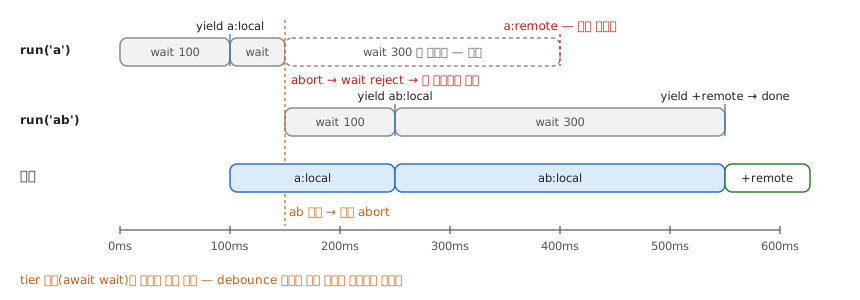
언제 — 시간이 코드의 한 방향(↓)으로만 흐를 때: 멀티 단계 loading · progressive search(tier 경계 = 취소 지점, debounce 불필요) · optimistic mutation(optimistic | reconciled | rolledBack 전이를 콜백 넷 대신 한 함수로).
확인 — 원본 데모 대비 채운 셋: ERRORED 를 선언만 하고 안 쓰던 것(→ catch), unmount 시 취소(→ AbortSignal + cleanup), 타입(→ 제네릭 훅). 검색창에 a 다음 바로 ab 를 치면 a:remote 가 끼어들지 않고 ab:local → ab:local,ab:remote 로만 바뀌면 된 것이다.
- 출처: @ericclemmons