- content-visibility: the new CSS property that boosts your rendering performance1
- More on content-visibility | CSS-Tricks2
- When is it “Right” to Reach for contain and will-change in CSS? - CSS-Tricks3
- contain - CSS: Cascading Style Sheets | MDN
- How I made Google’s data grid scroll 10x faster with one line of CSS | by Johan Isaksson | Oct, 2021 | Medium
Footnotes
Core Web Vitals & Performance Metrics
- Web Vitals
- Largest Contentful Paint (LCP)
- Optimize Largest Contentful Paint
- Largest Contentful Paint(최대 콘텐츠풀 페인트, LCP)
- Interaction to Next Paint(INP)
LCP 최적화
- AddyOsmani.com - Preload late-discovered Hero images faster
- How to improve the performance of your hero images - MeasureWorks
- Hack your PageSpeed LCP metric by enlarging your hero image | Erwin Hofman
- Optimising images for better LCP web vitals scores | by Javier Villanueva | ITNEXT
- Improve Largest Contentful Paint (LCP) With A JS + CSS Trick - Propel Digital Media Solutions
- Get a perfect Largest Contentful Paint (LCP) time with a single line of code - DevisedLabs
이미지 및 리소스 로딩 최적화
- The Humble
<img />Element And Core Web Vitals — Smashing Magazine - Preload, prefetch and other
<link />tags: what they do and when to use them · PerfPerfPerf - Optimizing resource loading with Priority Hints
- 향후 탐색 속도를 높이기 위해 리소스 미리 가져오기 | web.dev
- 즉각적인 페이지 탐색을 위해 Chrome에서 페이지 사전 렌더링 | Chrome for Developers
- Speculation Rules API - Web APIs | MDN
- https://csswizardry.com/2024/12/a-layered-approach-to-speculation-rules/
- https://blog.cloudflare.com/ko-kr/introducing-speed-brain/
사이트 속도 및 성능 최적화
- Fast load times
- Efficiently load third-party JavaScript
- How to Stop Lighthouse Complaining About Render Blocking Google Fonts | Codeboosh
- How To Leverage Browser Caching to Improve Site Speed | DebugBear
CSS 기반 성능 최적화
- Improving rendering performance with CSS content-visibility | Read the Tea Leaves
- CSS content-visibility for React devs - DEV Community
서드파티 스크립트 및 자원 관리
- Best practices for using third-party embeds
- Optimize loading third-parties
- A Next.js package for managing third-party libraries | Chrome for Developers
- Building a Faster Web Experience with the postTask Scheduler | by Callie | The Airbnb Tech Blog | Medium
Partytown 및 서드파티 스크립트 성능 개선
- Welcome To Partytown
- How we cut 99% of our JavaScript with Qwik + Partytown
- Introducing Partytown 🎉: Run Third-Party Scripts From a Web Worker - DEV Community
케이스 스터디: 웹 성능 개선 사례
- How We Improved Our Core Web Vitals (Case Study) — Smashing Magazine
- Case study: Analyzing Notion app performance · PerfPerfPerf
- A Netflix Web Performance Case Study | by Addy Osmani | Dev Channel | Medium
- React Performance Fixes on Airbnb Listing Pages | by Joe Lencioni | The Airbnb Tech Blog | Medium
- How We Improved SmashingMag Performance — Smashing Magazine
- Instagram 성능 개선 사례
메모리 및 성능 이슈 해결
prefetch는 내려받기만 하고, prerender는 내려받은 뒤 렌더링까지 시작한다.
Tachyon은 <a>에 커서가 50ms 이상 머물면 <link rel="prerender">를 넣어주는 라이브러리.
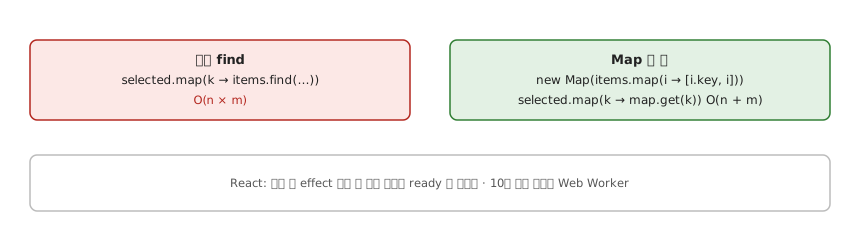
-- 대용량 목록에서 selected 키로 아이템 찾기
slow = [find ((== k) . key) items | k <- selected]   -- O(n × m)

index = Map.fromList [(key i, i) | i <- items]         -- 한 번 O(n)
fast  = mapMaybe (`Map.lookup` index) selected        -- O(m) — Map 조회는 선형보다 빠르다 (명세)

-- React: 렌더 뒤 effect 에서 한 번에 만들고 ready 로 알린다 (청크로 나누지 않는다)
useItemsIndex items = useEffect (setMap (index items) >> setReady True) [items]
-- 10만 개가 넘으면 Web Worker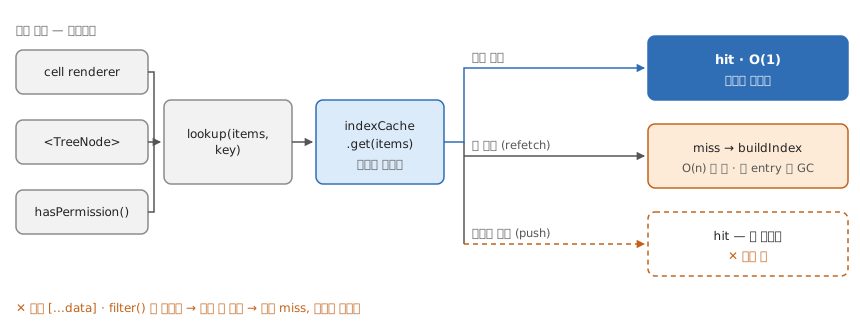
-- 같은 배열을 이름으로 반복 조회해 O(n) 스캔이 계속 도는데, 배열이 언제 바뀌는지 추적하기 싫을 때
-- 캐시 키를 배열의 내용이 아니라 참조로 둔다 — 무효화를 참조 동등성에 맡긴다
lookup :: Ref [Item] -> Name -> Cache -> (Maybe Id, Cache)
lookup items name cache = case WeakMap.get items cache of
  Just index -> (Map.lookup name index, cache)                 -- 여기부터 O(1)
  Nothing    -> let index = buildIndex (deref items)            -- 새 참조면 자동 miss, 한 번 O(n)
                in  (Map.lookup name index, WeakMap.set items index cache)
-- delete·clear 가 어디에도 없다: 불변 업데이트면 "데이터가 바뀜" = "참조가 바뀜"
-- 키가 weak 이라 옛 items 가 안 잡히면 entry 도 GC 된다. Map 이면 영구히 붙들려 누수

-- 결과는 참조만 보고 정해진다 — 내용은 보지 않는다
outcome :: SameRef -> SameContent -> Outcome
outcome True  True  = Hit
outcome False False = Rebuild   -- refetch. 옛 인덱스는 옛 배열과 함께 GC
outcome False True  = Miss      -- 매번 [...data]·data.filter() 로 넘긴다 — 무의미
outcome True  False = Wrong     -- push·splice 로 제자리에서 바꿨다 — 느린 게 아니라 틀린 값
-- TanStack Query 의 data·select 결과는 참조가 안정적이라 그대로 넘기면 된다

-- 된 것: 같은 참조로 두 번 불러 buildIndex 가 한 번만 돈다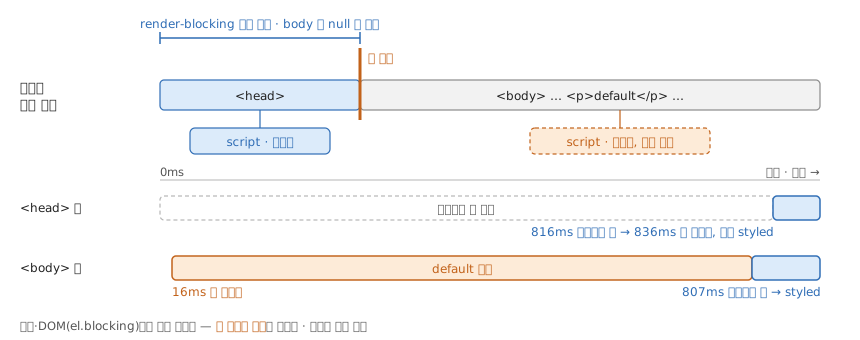
-- 새로고침 때 스타일이 붙기 전 default 가 한 프레임 보인다: 파서를 멈추는 것 ≠ paint 를 멈추는 것
-- render-blocking 등록 창은 <body> 가 열리기 전까지다 — "head 안에" 가 아니라 body == null
-- 그래서 컴포넌트 마크업 안이면 이미 늦다
allowsRenderBlocking :: Document -> Bool
allowsRenderBlocking doc = isNothing (body doc)

addBlocking :: Element -> Document -> Document
addBlocking el doc
  | allowsRenderBlocking doc = register el doc
  | otherwise                = doc          -- 실패 없이 무시: 로그도 el.blocking 도 앞뒤가 같다

-- 갈리는 건 첫 페인트 시각 하나
works :: Fcp -> ResponseEnd -> Bool         -- first-contentful-paint, slow.js 의 responseEnd
works fcp done = fcp >= done
-- 실측 (Chrome 154, slow.js 800ms): <head> 836 ≥ 816 ✓ · <body> 16 < 807 ✗

-- 다크 테마 흰 화면은 다른 축이다: 서버가 사용자 상태를 몰라 기본값으로 렌더했다
--   서버가 낸 HTML 자체가 이미 다른 값이라 렌더를 막아도 안 고쳐진다 → 첫 페인트 전 인라인 스크립트, 594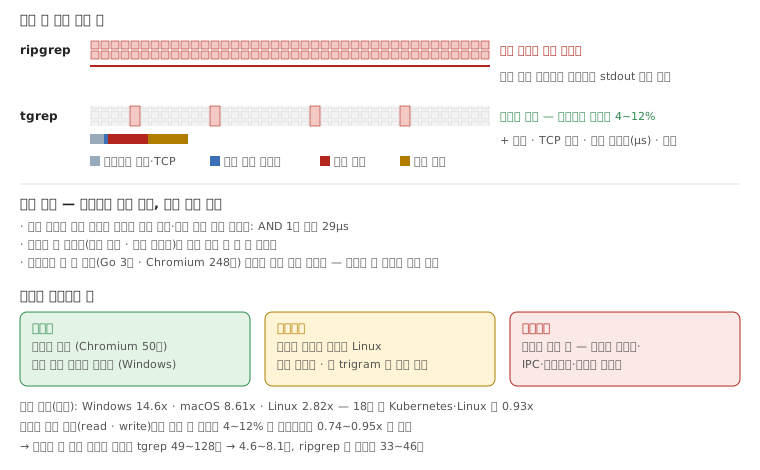
-- 질의 한 번의 비용. ripgrep 은 모든 파일을 열고, tgrep 은 고르는 데 거의 안 쓰고 후보만 연다
cost :: Tool -> Query -> Time
cost Ripgrep q = scanAll files q                                     -- 파일마다 열기·읽기·스캔. 찾은 줄은 스캔 스레드가 stdout 으로 바로
cost Tgrep   q = startup + rtt + lookup q + verify (candidates q) + deliver * matches q
  -- startup + rtt: 질의마다 새 클라이언트 프로세스 + 루프백 TCP 왕복 (벤치에 포함)
  -- lookup: 게시 목록이 파일 번호로 정렬돼 있어 정렬·중복 제거 없이 교집합 — AND 1만 파일 29μs, OR 64항 122μs
  --         마스크 두 바이트(이웃 자리 mod 8 · 다음 바이트 Bloom)가 확인 전에 한 번 더 거른다
  -- candidates: 커널 9.6만 파일에서 4~12% → 여는 파일 수가 한 자릿수 배로 준다
  -- deliver: 결과 한 줄마다 직렬화 → IPC → 역직렬화 → 출력. ripgrep 엔 없는 항
  -- 빠진 항: 인덱스 짓기(Go 3초 · Chromium 248초, macOS) — 한 번 내고 서버가 바뀐 것만 고친다. 벤치는 이걸 빼고 잰다

-- 그래서 차이를 움직이는 것 (행 순서 = 따지는 순서)
margin :: Query -> Repo -> Platform -> Effect
margin q _ _       | matches q `isTensOfThousands` = Flips    -- 배달비가 아낀 것보다 크다
                   | noUsefulTrigram q            = Shrinks  -- MatchAll: 전부 후보
margin _ _ Linux   = Shrinks                                   -- 따뜻한 페이지 캐시 + ripgrep 병렬 스캔이면 무작정 읽기도 싸다
margin _ _ Windows = Grows                                     -- 파일 하나 열기가 비싸 건너뛰는 이득이 어디서나 크다
margin _ r _       | largest r = Grows                         -- 파일이 많을수록 건너뛸 게 많다: Chromium 50만 · gecko 39만은 모든 플랫폼에서 이겼다
                   | otherwise = Shrinks                       -- 가장 작은 Go(1.6만)는 Linux 1.29x
  -- 2026-08-24 측정: 기하 평균 Windows 14.6x · macOS 8.61x · Linux 2.82x. 18칸 중 Kubernetes·Linux 만 0.93x
  -- 커널을 흔한 토큰(read · write)으로 쟀을 땐 후보가 4~12% 로 줄었는데도 0.74~0.95x 로 졌다
  --   → 실제로 쓸 법한 질의로 바꾸자 tgrep 49~128초 → 4.6~8.1초, ripgrep 은 그대로 33~46초 = 배달비만 따로 본 것
  -- 공용 러너 측정이라 같은 줄 안에서만 비교한다. macOS ripgrep 은 같은 질의도 385~550초로 흔들렸다