- Rethinking the JavaScript ternary operator1
- Break a forEach Loop with JavaScript2
- You Can Label a JavaScript
ifStatement | CSS-Tricks3 - Refactoring optional chaining into a large codebase: lessons learned – Lea Verou4
- [HTML5] 꼼꼼히 살펴보는 SCRIPT 엘리먼트 - 코드쓰는사람5
- Single Page Applications using Rust6
- Fast and maintainable patterns for fetching from a database – Sophie Alpert7
- Deep-copying in JavaScript using structuredClone8
- Holistic Review of TC39 “Dataflow” Proposals — Tab Completion9
Footnotes
-
삼항연산자(ternary)의 어두운면과 우려를 나타내는 글 ↩
-
forEach루프break하는 트릭. 참조하는 배열의 length값을 0으로. ↩ -
조건문에서
label을 지정해서 해당 블록으로break가 가능하다는걸 보여주는 내용. 실제 적용할만한 사례는 거의 없고 글쓴이는 while+switch문에서 break를 좀 더 효율적으로 사용한 예를 보여주고 있다. ↩ -
optional chaining 문법으로 리팩토링 하면서…변경 가능한 부분(삼항연산자, 배열, 기능탐지)과 주의사항(값 할당, 잘못된 위치에 표기), 조심할 부분(null/undefined, 연산 순서와 순위, return 항상 호출됨)으로 구분해서 정리한 글. 커밋을 보면 실제로 어떻게 작업했는지 확인도 가능하다. ↩
-
<script />태그와 속성값에 대한 정리 ↩ -
rust로 작성하고 wasm으로 컴파일해서 클라이언트 프로그램을 작성하는 방법을 자세하게 설명하고 있다. rust에 관심이 있거나 하다면 볼만한 글. ↩
-
종속성 구조를 파악해서 최적의 병렬화로 빠르게 데이터 가져오기 ↩
-
structuredClone()↩ -
pipe, flow 제안(초안)사항을 검토하는 관점에서 보는 시각 ↩
- Temporal documentation1
- Is It Time for the JavaScript Temporal API?2
- JS Dates Are About to Be Fixed | TimeTime
- Using Intl.RelativeTimeFormat for Localized Relative Timings
- Everything You Need to Know About Date in JavaScript | CSS-Tricks3
- 자바스크립트에서 타임존 다루기 (1) : NHN Cloud Meetup4
- 자바스크립트에서 타임존 다루기 (2) : NHN Cloud Meetup
Footnotes
import isAfter from 'date-fns/isAfter';

isAfter(new Date(), new Date(DATE))
new Date(문자열) 이 보장하는 건 ISO 형식(2022-04-09T12:00:00)뿐이고, 공백으로 가른 2022-04-09 12:00:00 은 구현 정의라 엔진마다 다르다.1
날짜 비교 할 일이 있어서 별 생각 없이 new Date를 때렸는데 safari에서 안되는 문제가 발견되었다. 콘솔을 확인해보니 yyyy-MM-dd HH:mm:ss 해당 형태의 포멧 에서는 안된다. 평소에 new Date 보다는 moment나 date-fns같은 라이브러리를 당연하게 써오다 보니 몰랐다. 그런데 또 다른 생각을 해보자면 저런 문제가 있기 때문에 더 적극적으로 라이브러리를 사용해야 한다는 게 함정.
import isAfter from 'date-fns/isAfter';
import parse from 'date-fns/parse';

isAfter(new Date(), parse(DATE, 'yyyy-MM-dd HH:mm:ss', new Date()))Footnotes
-
Date.parse() - MDN: “The date time string format (produced by toISOString()) must be supported.” / “Other formats are implementation-defined and may not work across all browsers. A library can help if many different formats are to be accommodated.” ↩
- An Intro to JavaScript Proxy | CSS-Tricks1
- Javascript Proxies : Real World Use Cases – Arbaz Siddiqui2
- JavaScript Proxy with Storage
- Getting Started with JavaScript Proxy Object3
- Evan You on Proxies - Advanced Components | Vue Mastery4
Reflect
- JavaScript: Why Reflect APIs?
- JavaScript Proxy. 근데 이제 Reflect를 곁들인 | TOAST UI :: Make Your Web Delicious!
- The global
Reflectobject, its use cases and things to watch out for | Stefan Judis Web Development - How JavaScript works: Proxy and Reflect | by Ukpaiugochi | SessionStack Blog
- Reflection at Reflect: The Reflect and Proxy APIs | Reflect
Footnotes
const obj = {
  a: 1,
  b: 2,
}

console.log(obj[['a']]) // 1
console.log(obj[['b']]) // 2
이게 되네 🤔 — 속성 키는 문자열·Symbol 뿐이라 배열이 문자열로 바뀐다: String(['a']) 는 'a', String(['a', 'b']) 는 'a,b'.1
Footnotes
-
Property accessors - MDN: “Each property name is a string or a Symbol. Any other value, including a number, is coerced to a string.” ↩
- Promises From The Ground Up • Josh W. Comeau
- ⭐️🎀 JavaScript Visualized: Promises & Async/Await - DEV Community
- JavaScript Visualized - Promise Execution
- Running Promises In Parallel: A Visual Guide | JulesBlom.com
- await vs return vs return await - JakeArchibald.com1
- The gotcha of unhandled promise rejections - JakeArchibald.com
- 14 Linting Rules To Help You Write Asynchronous Code in JavaScript - Maxim Orlov2
- Async/Await without Try/Catch Block in JavaScript3
- Cancelable Async Flows4
- ECMAScript 2024 feature:
Promise.withResolvers()
Footnotes
Map으로 localStorage 래핑 — JSON.stringify(map) 은 {} 라서 [...map](엔트리 배열)으로 저장하고 new Map(entries) 로 되살린다1
class LocalStorageMap {
  constructor(storageKey) {
    this.storageKey = storageKey
    this.map = this.loadFromStorage()
  }

  loadFromStorage() {
    const data = localStorage.getItem(this.storageKey)
    return data ? new Map(JSON.parse(data)) : new Map()
  }

  saveToStorage() {
    localStorage.setItem(this.storageKey, JSON.stringify([...this.map]))
  }

  set(key, value) {
    this.map.set(key, value)
    this.saveToStorage()
  }

  get(key) {
    return this.map.get(key)
  }

  delete(key) {
    const result = this.map.delete(key)
    this.saveToStorage()
    return result
  }

  clear() {
    this.map.clear()
    localStorage.removeItem(this.storageKey)
  }
}- localStorage는 문자열만 저장 → JSON 직렬화 필수
- 출처당 5MiB — 넘으면
setItem이QuotaExceededError를 던진다2
Footnotes
-
JSON.stringify() - MDN: “Only enumerable own properties are visited. This means Map, Set, etc. will become “{}”.“ ↩
-
Storage quotas and eviction criteria - MDN: “Browsers can store up to 5 MiB of local storage, and 5 MiB of session storage per origin.” · “Once this limit is reached, browsers throw a
QuotaExceededErrorexception” ↩
전화번호 포맷팅 — replace 는 매치된 부분만 바꾸고 나머지는 뒤에 그대로 남긴다. 그래서 그룹 자릿수 합이 길이와 같아야 한다1
function formatPhoneNumber(phoneNumber) {
  const cleaned = phoneNumber.replace(/\D/g, '')

  if (cleaned.length === 11) {
    return cleaned.replace(/(\d{3})(\d{4})(\d{4})/, '$1-$2-$3')
  } else if (cleaned.length === 10 && cleaned.startsWith('02')) {
    return cleaned.replace(/(\d{2})(\d{4})(\d{4})/, '$1-$2-$3')
  } else if (cleaned.length === 10) {
    return cleaned.replace(/(\d{3})(\d{3})(\d{4})/, '$1-$2-$3')
  } else if (cleaned.length === 9 && cleaned.startsWith('02')) {
    return cleaned.replace(/(\d{2})(\d{3})(\d{4})/, '$1-$2-$3')
  }
  return 'Invalid phone number'
}

formatPhoneNumber('01012341234') // 010-1234-1234
formatPhoneNumber('021234567') // 02-123-4567
formatPhoneNumber('0212345678') // 02-1234-5678
Footnotes
-
String.prototype.replace() - MDN: “returns a new string with one, some, or all matches of a
patternreplaced by areplacement.” ↩
거리 만km 포맷팅 — toFixed(1) 은 반올림하고 0 까지 채운 문자열을 준다(100000 → 10.0만km)1
function formatToManKm(distance: number): string {
  const manKm = (distance / 10000).toFixed(1)

  return `${manKm}만km`
}

formatToManKm(104335) // "10.4만km"
Footnotes
-
Number.prototype.toFixed() - MDN: “The number is rounded if necessary, and the fractional part is padded with zeros if necessary so that it has the specified length.” ↩
특수 기호 제거
function removeSpecialCharacters(input) {
  return input.replace(/[!@#$%^&*()_+\-=\[\]{};':"\\|,.<>\/?]+/g, '')
}

removeSpecialCharacters('Hello_World123! 안녕하세요?')
// "HelloWorld123 안녕하세요"JavaScript delete 연산자 — configurable 한 자기 속성만 지운다. 그 밖엔 non-strict 에선 false, strict(모듈·클래스)에선 예외다1
const obj = { name: 'Alice', age: 25 }
delete obj.age // true

// 존재하지 않는 속성 삭제도 true
delete obj.city // true

// configurable: false는 삭제 불가
const locked = Object.defineProperty({}, 'readOnly', {
  value: 'I cannot be deleted',
  configurable: false,
})
delete locked.readOnly // false (strict 에선 TypeError)

// 변수 삭제 불가 (strict 에선 SyntaxError)
let globalVar = 'exists'
delete globalVar // false

// 배열 요소 삭제 (hole 생성)
let arr = [1, 2, 3]
delete arr[1] // [1, <empty>, 3]- 설정 가능한(configurable) 속성에만 사용
- 배열은
splice권장
Footnotes
-
delete - MDN: “
truefor all cases except when the property is an own non-configurable property, in which casefalseis returned in non-strict mode.” · “delete variablewill throw aSyntaxErrorin strict mode, and will have no effect in non-strict mode.” ↩
DFS (깊이 우선 탐색)
// 재귀 방식
function dfs(graph, node, visited = new Set()) {
  visited.add(node)
  console.log(node)
  graph[node].forEach((neighbor) => {
    if (!visited.has(neighbor)) dfs(graph, neighbor, visited)
  })
}

// 스택 방식
function dfsStack(graph, startNode) {
  const stack = [startNode]
  const visited = new Set()

  while (stack.length > 0) {
    const node = stack.pop()

    if (!visited.has(node)) {
      console.log(node)
      visited.add(node)
      graph[node]
        .slice()
        .reverse()
        .forEach((neighbor) => {
          if (!visited.has(neighbor)) stack.push(neighbor)
        })
    }
  }
}

const graph = {
  0: [1, 2],
  1: [0, 3, 4],
  2: [0, 5],
  3: [1],
  4: [1],
  5: [2],
}
dfs(graph, 0) // 0, 1, 3, 4, 2, 5- 캔버스로 동영상 프레임을 캡쳐한다.
- 텍스트를 입력 받는다. 해당 텍스트를 서버에 보내고 음성파일을 응답받는다.
Blob데이터는URL.createObjectURL()로 변환해서img,audio태그에 연결한다1.
- [JS] Blob와 Blob URL - 코드쓰는사람
- Handle Blobs requests with Axios the right way | by Marios Fakiolas | Medium
- Blob(블랍) 이해하기 | HEROPY
- File API 정리하기. 최근 FileReader 를 사용할 일이 생겨 File API 를 정리… | by 박성룡 ( Andrew park ) | Medium
Footnotes
-
URL.createObjectURL() | MDN: “creates a string containing a blob URL pointing to the object given in the parameter.” ↩
The
Generatorobject is returned by a generator function and it conforms to both the iterable protocol and the iterator protocol.
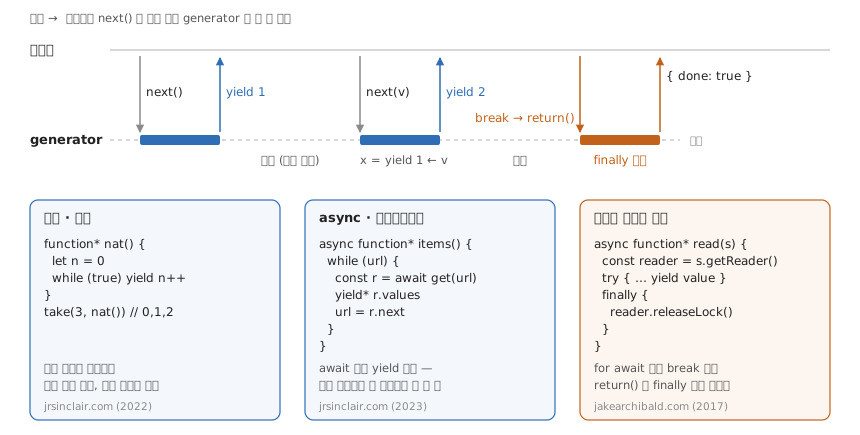
useGenerator— 핸들러를 async generator 로 받아 yield 마다 상태를 바꾼다- Iterator Helpers — async generator 페이지네이션을
take로 조기 종료 - Maybe Monad — generator 로 early return
- Async iterators and generators - JakeArchibald.com1
- How to consume a paginated API using JavaScript async generators
- Why would anyone need JavaScript generator functions?
Footnotes
-
Streaming 작업 시 비동기처리 방법을 알려주고 있는데…경험이 없어서 일단 메모. ↩
JavaScript 부동소수점 오차 - 0.1 + 0.2 = 0.30000000000000004
IEEE 754 64비트 부동소수점 표준1. 0.1은 이진법으로 무한 반복(0.0001100110011...)이라 근사치 저장됨.
// 해결책
;(1.1 * 10 + 0.1 * 10) / 10 // 정수 변환
parseFloat((1.1 + 0.1).toFixed(1)) // toFixed
Math.abs(1.1 + 0.1 - 1.2) < Number.EPSILON * 1.2 // 비교 시 (오차 × 크기)
// 정밀 계산: decimal.js, big.js, bignumber.js
Number.EPSILON 은 1 근처에서만 맞는 허용 오차다 — 1.1 + 0.1 - 1.2 는 정확히 EPSILON 이라 < 비교가 false 가 된다.2
JS만의 문제 아님. Python, Java, C++ 등 IEEE 754 사용하는 모든 언어에서 동일.
Footnotes
-
Number - MDN: “The JavaScript Number type is a double-precision 64-bit binary format IEEE 754 value, like double in Java or C#.” ↩
-
Number.EPSILON - MDN: “Important takeaway: do not simply use Number.EPSILON as a threshold for equality testing. Use a threshold that is appropriate for the magnitude and accuracy of the numbers you are comparing.” ↩
Date.getDay() - 로컬 시간 기준 요일 반환 (0=일요일, 6=토요일)1
new Date().getDay() // 0~6
new Date(2024, 11, 25).getDay() // 3 (수요일) — 월은 0부터 시작
new Date('2024-12-25').getDay() // ⚠ 날짜만 쓴 문자열은 UTC 자정 → UTC보다 느린 시간대(미국 등)에선 2

const days = ['일', '월', '화', '수', '목', '금', '토']
days[new Date().getDay()] // 오늘 요일
Footnotes
-
Date.prototype.getDay() - MDN: “returns the day of the week for this date according to local time, where 0 represents Sunday.” / Date time string format - MDN: “When the time zone offset is absent, date-only forms are interpreted as a UTC time and date-time forms are interpreted as a local time.” ↩
현재 시간부터 목표 시간까지 남은 시간 계산 — Date 끼리 빼면 숫자 문맥에서 타임스탬프(ms)로 바뀌어 차가 밀리초로 나온다.1
function calculateRemainingTime(targetTime) {
  const now = new Date()
  const [h, m, s] = targetTime.split(':').map(Number)

  const target = new Date()
  target.setHours(h, m, s)

  const diff = target - now
  if (diff < 0) return null

  return {
    hours: Math.floor(diff / 3600000) % 24,
    minutes: Math.floor(diff / 60000) % 60,
    seconds: Math.floor(diff / 1000) % 60,
  }
}

calculateRemainingTime('18:30:00')
// { hours: 2, minutes: 15, seconds: 30 }
Footnotes
-
Date — MDN: “The valueOf() and Symbol.toPrimitive (when passed “number”) methods — which are automatically called in number coercion — return the timestamp, causing Date objects to behave like their timestamps when used in number contexts.“ ↩
두 요소 스크롤 동기화
const box1 = document.getElementById('box1')
const box2 = document.getElementById('box2')

let ignore = null

function sync(source, target) {
  if (ignore === source) { ignore = null; return } // 내가 일으킨 scroll 이벤트는 한 번 건너뛴다
  const ratio = source.scrollLeft / (source.scrollWidth - source.clientWidth)
  const next = Math.round(ratio * (target.scrollWidth - target.clientWidth))
  if (target.scrollLeft === next) return // 값이 안 바뀌면 이벤트도 안 온다 — ignore 를 세우면 다음 사용자 스크롤을 삼킨다
  ignore = target
  target.scrollLeft = next
}

box1.addEventListener('scroll', () => sync(box1, box2))
box2.addEventListener('scroll', () => sync(box2, box1))
scroll 이벤트는 scrollLeft 를 넣는 순간이 아니라 다음 렌더링 때 온다1 — 동기 플래그(isSyncing = true … false)는 이벤트가 오기 전에 이미 풀려 있어서 막지 못한다. 그래서 “다음에 올 이벤트 하나”를 표시해 둔다.
Footnotes
-
CSSOM View — Scrolling events: “Whenever an element gets scrolled (whether in response to user interaction or by an API), the user agent must run these steps: … Append (element, “scroll”) to doc’s pending scroll events.“ — 실제 발사는 이벤트 루프의 렌더링 단계(“run the scroll steps”)에서 한다. ↩
콜백 → Promise → async/await
// 콜백
fetchData(() => {
  processData(() => {
    displayData()
  })
})

// Promise 체인
fetchData().then(processData).then(displayData)

// async/await
async function main() {
  const data = await fetchData()
  const processed = await processData(data)
  await displayData(processed)
}
Promise는 모나드처럼 동작 — then 은 콜백이 Promise 를 돌려주면 풀어서 잇는다(flatMap). 값을 돌려주면 감싼다(map). 한 메서드가 둘 다 해서 Promise<Promise<T>> 는 만들어지지 않는다.1
Footnotes
-
Promise.prototype.then() — MDN: “The value returned from then() is resolved in the same way as Promise.resolve(). This means thenable objects are supported, and if the return value is not a promise, it’s implicitly wrapped in a Promise and then resolved.” ↩
이벤트 루프 한 턴 — 마이크로태스크가 setTimeout(0) 보다 항상 먼저다
마이크로태스크 큐는 매 턴 끝까지 비워진다 — 그래서 then·queueMicrotask는 항상 setTimeout(0)보다 먼저다.1
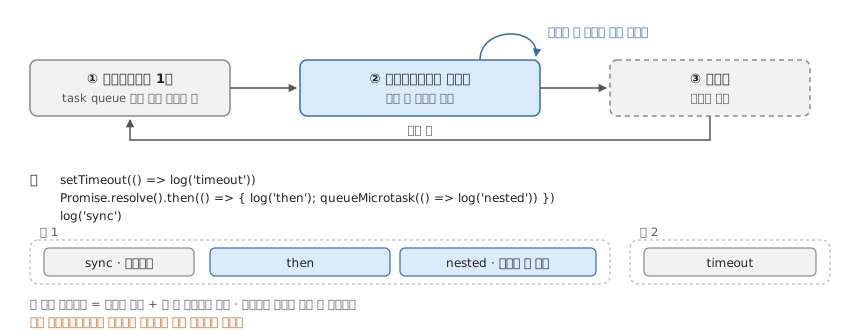
한 스텝씩 보려면:
Footnotes
-
In depth: Microtasks and the JavaScript runtime environment — MDN: “execution of microtasks continues until the queue is empty—even if new ones are scheduled in the interim. In other words, microtasks can enqueue new microtasks and those new microtasks will execute before the next task begins to run” ↩
Iterator Helpers의 지연 평가
조기 종료를 take에 위임하면 필요한 만큼만 fetch 한다.1 페이지네이션 API에서 “조건에 맞는 N개”만 필요할 때. sync 는 네이티브(모던 브라우저·Node 22+), async 는 제안(Stage 2)이라 core-js 폴리필.
import 'core-js/proposals/async-iterator-helpers.js'

type Page<T> = { items: T[]; next: string | null }

/** 커서 페이지네이션 API 를 순회한다 — 현재 페이지를 다 당긴 뒤에야 다음 페이지를 받는다. */
async function* fetchPages<T>(url: string | null): AsyncGenerator<T> {
  while (url) {
    const { items, next }: Page<T> = await fetch(url).then((r) => r.json())
    yield* items
    url = next
  }
}

await AsyncIterator.from(fetchPages<Item>('/api/items')).filter(isValid).take(10).toArray()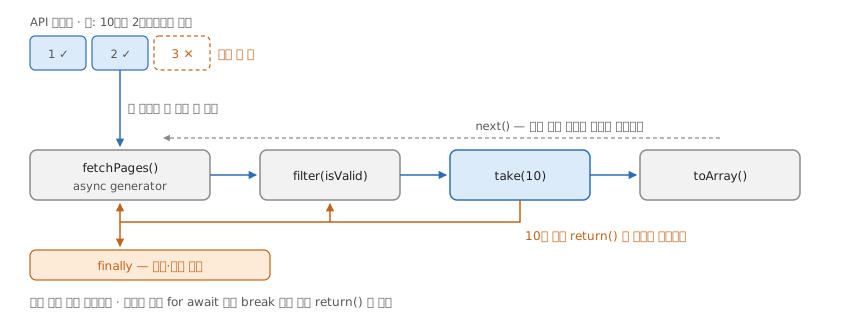
- 제안이 개정 중이다 — 동시
next()동작이 미정이라 폴리필과 다를 수 있다. 순차로 당기는toArray엔 영향 없음. - TS 타입이 없다 — TS 5.8 lib·core-js 어디에도
AsyncIterator.from선언이 없어 직접 선언한다.
Footnotes
-
다 찬 뒤 한 번 더 당겨질 때 소스를 닫는다. Async Iterator Helpers — AsyncIterator.prototype.take: “If remaining is 0, then Return ? AsyncIteratorClose(iterated, NormalCompletion(undefined)).” sync 쪽 ECMA-262
Iterator.prototype.take도 같은 자리에서IteratorClose한다. ↩
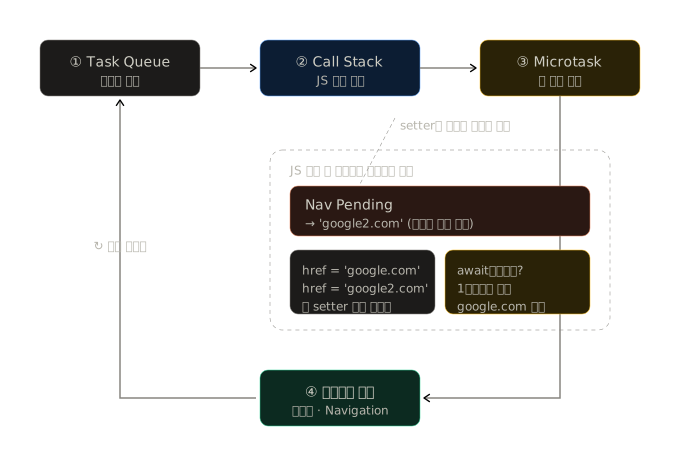
location.href 는 암묵적 await 가 아니다 — setter 는 동기, navigation 은 태스크
location.href에 값을 넣으면 그 줄에서 멈추고 이동할 것 같다 — 암묵적 await 처럼. 그럼 뒤의 코드는 안 돌까. 추측하지 말고 CDP로 깨 본다.
1. 실험을 건다
외부 도메인 대신 로컬 서버의 /a·/b로 이동시킨다(서버는 받은 요청을 기록한다). Runtime·Page·Network를 enable 하고, 마지막 식의 값까지 돌려받게 한 줄을 붙여 Runtime.evaluate로 실행한다.
location.href = '/a'
console.log('실행됨 1')
location.href = '/b'
console.log('실행됨 2')
// 'evaluate 끝까지 돌았다'await였다면 첫 줄에서 멈춰 실행됨 1도 안 찍히고 /a로 가야 한다.
2. 이벤트 순서를 읽는다
CDP가 받은 순서 그대로다.1
| ms | 이벤트 | |
|---|---|---|
| 514 | Page.frameRequestedNavigation |
/a · scriptInitiated |
| 516 | Runtime.consoleAPICalled |
실행됨 1 |
| 517 | Page.frameRequestedNavigation |
/b |
| 517 | Runtime.consoleAPICalled |
실행됨 2 |
| 517 | Runtime.evaluate 응답 |
'evaluate 끝까지 돌았다' |
| 518 | Page.frameStartedNavigating |
/a |
| 520 | Network.requestWillBeSent |
/a |
| 521 | Network.loadingFailed |
net::ERR_ABORTED · canceled: true |
| 523 | Page.frameStartedNavigating · requestWillBeSent |
/b |
| 528 | Page.frameNavigated |
/b |
- setter는 동기로 끝나고 흐름을 안 끊는다. 이동 요청(
frameRequestedNavigation)이 console 로그 사이사이에 찍히고,evaluate가 마지막 식의 값을 돌려준다 — 코드는 끝까지 돌았다. - 실제 이동은 그 뒤에 시작된다.
frameStartedNavigating은evaluate가 끝난 다음이다. 문서 언로드·페치는 태스크로 넘어가 지금 코드가 끝난 뒤에 돈다. - 마지막 값이 이기는 건 앞의 것이 취소되기 때문이다.
/a가 시작됐다가/b가 시작되며ERR_ABORTED로 끊긴다.2 덮어쓴 게 아니다.
3. 덤 — 버려진 이동도 서버에는 갔다
서버 기록은 ["/a","/b"]다. /a는 requestWillBeSent까지 갔다가 클라이언트에서 끊겼을 뿐, 요청은 서버에 도착했다. 이동 전에 서버 부수효과가 있는 URL(로그아웃 링크 같은)이라면 “결국 /b로 갔으니 /a는 없던 일”이 아니다 — 572의 “취소는 클라이언트에서만 일어난다”와 같은 이야기다.
Footnotes
- How to Modify Nodes in an Abstract Syntax Tree | CSS-Tricks1
- AST for JavaScript developers. TL;DR This article is my talk for… | by Bohdan Liashenko | ITNEXT2
- GitHub - NV/CSSOM: Unmaintained! ⚠️ CSS Object Model implemented in pure JavaScript. Also, a CSS parser.3
- GitHub - csstree/csstree: A tool set for CSS including fast detailed parser, walker, generator and lexer based on W3C specs and browser implementations
Footnotes
Designing a JavaScript Plugin System | CSS-Tricks1
Footnotes
-
플러그인은 라이브러리와 프레임워크의 공통 기능이며 개발자가 안전하고 확장 가능한 방식으로 기능을 추가할 수 있도록 한다. 그래서 추가 유지 관리 부담이 없다. ↩
Quick tip: reusable Array search predicates - JASON Format
arr.filter(callback(element[, index[, array]])[, thisArg])배열 메서드의 2번째 인자 thisArg는 콜백의 this가 된다 — 비교할 값을 this로 받는 function 하나를 여러 검색에 재사용하는 트릭. 화살표 함수는 this가 없어 thisArg가 무시된다1. 단 화살표 함수보다 느릴 수 있다2.
Footnotes
-
Array — Iterative methods | MDN: “The
thisArgargument is irrelevant for anycallbackFndefined with an arrow function, as arrow functions don’t have their ownthisbinding.” ↩ -
Quick tip: reusable Array search predicates: “the performance of this approach can be worse than using an Arrow Function without some restrictions.” ↩